

A staff member taps their card at the entrance, but the reader gives no response and others are left waiting. It’s easy to assume the reader has failed. If you’re searching for troubleshooting access control card reader Hertfordshire advice, first trace the fault through the system, from credential to controller, rather than replacing hardware straight away.
Delays at a controlled entry point can disrupt daily operations and undermine confidence in site security. A careful, authorised check can help narrow down the cause without bypassing controls, opening equipment or compromising security.
This guide sets out a safe, structured process. Learn how to compare an affected card with another authorised credential, note reader indicators and affected doors, and check available system events for clues. It also explains what staff can check, what information to record, and when a power, connectivity, controller or configuration issue needs professional diagnosis. If the fault persists, a clear handover can help an access control specialist serving Hertfordshire plan focused maintenance or commissioning.
Key Takeaways
- Record the affected entry point and the reader’s behaviour to distinguish a rejected card from an intermittent or unresponsive reader.
- Compare the fault across authorised credentials and doors to establish whether it appears isolated or may involve more of the system.
- Keep troubleshooting access control card reader Hertfordshire checks within your authorisation. Don’t open equipment, alter wiring or weaken security.
- Use the evidence to decide whether the next step concerns a credential, reader or wider system diagnosis. Don’t assume replacement is needed.
- When arranging professional support, provide symptoms, locations, timestamps and checks completed to help inform diagnosis, repair planning and commissioning.
Access control card reader problems in Hertfordshire: identify the impact first
A card reader fault can hold up staff and visitors at a commercial entrance. It may reject a credential, respond intermittently or show no visible or audible response. Before deciding that the reader itself has failed, establish the scale of the problem. Note the affected door, who is experiencing it and when it happens.
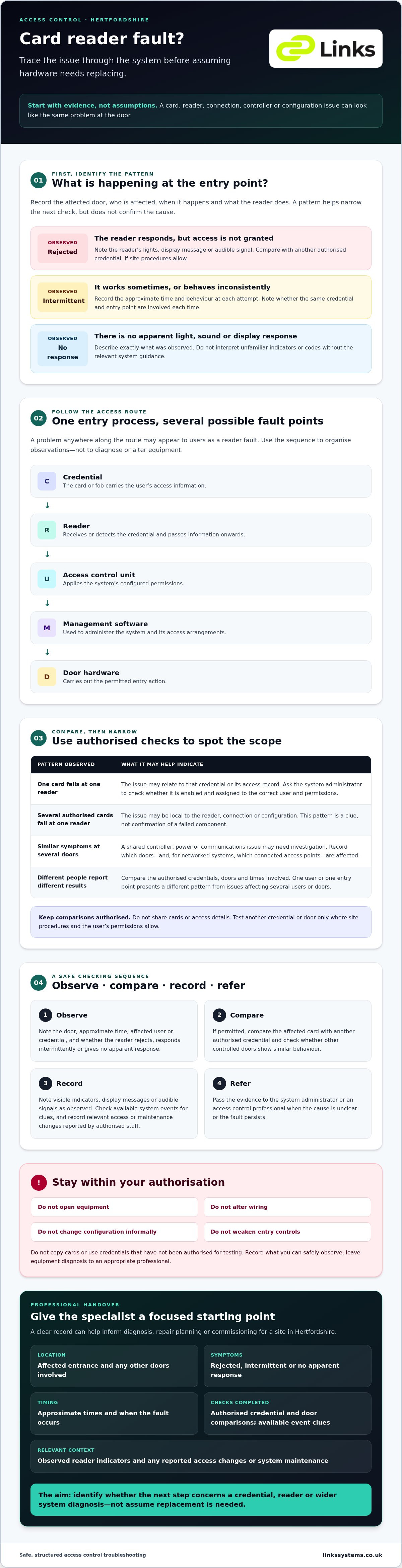
A reader is one part of a wider access control system. The card or fob, reader, access control unit, door hardware and management software all contribute to the access process. A problem anywhere along that route may appear to users as a reader fault. For troubleshooting access control card reader Hertfordshire sites, start by documenting the impact rather than changing equipment.
What does a card reader fault look like?
Distinguish a card that appears to be rejected from a reader that gives no apparent response. Check whether the issue affects one person, one credential or several authorised users. If site procedures allow, compare the affected credential with another authorised one, without sharing cards or access details. Record the door, approximate time and what happened at each attempt. Note lights, display messages or audible signals as observed, but don’t interpret unfamiliar codes without the system guidance.
This record helps show whether the fault is consistent or intermittent. An issue reported by one user at one entrance presents a different pattern from failures reported by several users across multiple doors. Neither pattern confirms the cause, but each helps focus the next checks.
Which parts of the access control system are involved?
The credential carries the user’s access information. The reader receives or detects it and passes information to an access control unit, which applies the system’s configured permissions. Management software is used to administer the system, while door hardware carries out the permitted entry action. A fault can arise between these components, so replacing a reader without diagnosis may not resolve the underlying issue. This overview of access control systems provides further background on the principles involved.
For a commercial office, warehouse or shared workplace in Hertfordshire, note whether one entrance is affected or other controlled doors show similar behaviour. Include relevant changes reported by authorised site staff, such as a change in access arrangements or system administration. Keep checks within your role: observe and document, but don’t open equipment, alter wiring, change configuration or weaken entry controls. If the cause isn’t clear, pass the recorded details to an access control professional for diagnosis.
Diagnose card reader symptoms by checking the credential, reader and controller
Once you’ve recorded what users experience, compare the fault across authorised credentials and entry points. These checks can indicate whether the problem is limited to one card, one reader or a wider part of the system. They don’t confirm which component has failed, so treat the results as clues for the next step.
When is the access card or credential the likely cause?
If one authorised card fails repeatedly but another authorised card works at the same reader, the issue may relate to the first credential or its access record. Ask the system administrator to check that it remains enabled and is assigned to the correct user and access permissions. Follow site procedures for any comparison test. Don’t copy cards, change permissions informally or use a credential that hasn’t been authorised for testing.
Consider recent staff changes, access-right updates or system maintenance. If a credential stopped working after an administrative change, share the timing with the administrator rather than attempting to alter the record yourself. A card working at another door can also be useful information, but only if the user is authorised to access that location.
When might the reader, controller or connection be involved?
Look at the pattern across the site. If one reader is affected while other doors operate normally, the issue may be local to the device, connection or configuration. If several doors linked to the same system show similar symptoms, a shared controller, power or communications issue may need investigation. For networked systems, record whether connected access points are affected too.
These patterns narrow the scope but don’t prove that a particular component is faulty. Don’t open enclosures, inspect wiring or make configuration changes unless you’re authorised and competent to do so. Instead, record the affected doors, credentials tested, timings and any recent changes. This gives a technician a clearer starting point and helps avoid replacing a reader before the fault is understood.
For troubleshooting access control card reader Hertfordshire sites, a consistent comparison is more useful than repeatedly trying the same card. If authorised checks don’t isolate the issue, a professional can assess the system and plan any required maintenance or commissioning. Links Integrated Systems supplies and maintains commercial access control systems in Hertfordshire.
Troubleshoot an access control card reader in Hertfordshire step by step
Use a consistent sequence rather than making repeated attempts or changing settings. For troubleshooting access control card reader Hertfordshire sites, staff should limit checks to actions permitted by site procedures and their role. The aim is to gather reliable information for the system administrator, not to repair equipment at the door.
A safe first-check sequence for site staff
- Confirm the report. Identify the exact entrance and ask what happened. Was the credential rejected, or did the reader appear not to respond? Note whether the problem is continuing or intermittent.
- Check how the credential is presented. Confirm the user is using their own authorised card or fob at the intended reader, following the site’s normal procedure. Don’t lend or share credentials.
- Observe the reader. Record visible lights, display messages or audible signals. Don’t guess at the meaning of an unfamiliar indicator or code.
- Compare cautiously. If site procedures permit, check the result with another known authorised credential. Record what happened during each test, without trying unauthorised cards or repeating attempts unnecessarily.
- Contact the administrator. Ask them to confirm that the affected user’s credential is enabled and assigned correctly, and whether scheduled access settings apply at that time.
- Log the details. Record the door location, timestamps, affected users, credentials tested, observed indicators and relevant recent changes, such as staff or access-right updates.
Keep the notes factual. “No visible response at the east entrance at 09:10” is more useful than concluding that the reader is broken. If other doors are involved, list them separately so the administrator can see the extent of the disruption.
Checks to leave to an authorised access control professional
Don’t remove reader covers, handle wiring or change controller settings unless you’re specifically authorised and competent to do so. Power, communications, firmware and configuration checks may affect other doors or system security. Refer these matters to an appropriate access control professional rather than attempting an unapproved adjustment.
Where system logs are available to authorised staff, preserve relevant entries and follow your organisation’s incident and security procedures. Stop troubleshooting if the door’s operation becomes unsafe, access security could be weakened or equipment appears damaged. Keep the entrance under the site’s established security arrangements and escalate the issue to the responsible administrator. A clear record of checks already completed helps support focused professional diagnosis.
Choose between a credential fix, reader repair and wider system diagnosis
The pattern of failure helps determine the next step, but it doesn’t confirm the cause. Consider how many credentials and doors are affected, what evidence is available and whether the issue could affect secure entry. Replacing a reader simply because a card was rejected can leave the actual fault unresolved.
How to match observed symptoms to the next action
- One credential fails at a door: Ask the system administrator to confirm its status, user assignment and access permissions before considering hardware work.
- Several authorised credentials fail at one door: Have the reader, its connection and relevant configuration investigated. Keep checks non-invasive unless an authorised professional takes over.
- Several doors fail around the same time: Request wider system-level diagnosis. Shared controllers, power or communications may be relevant, so replacing individual readers before investigating the pattern may be premature.
These are diagnostic indicators, not proof. A consistent record of affected doors, credential tests and fault times helps the person responsible for diagnosis decide what to examine next. Also consider the security impact. If normal entry or controlled access is compromised, follow site procedures and escalate promptly rather than making informal changes.
When do access control logs and connected systems help?
An authorised administrator may be able to review system events around the reported fault time. Compare the records with the staff member’s account and note whether similar events appear at other doors. Logs can provide useful context, but their meaning depends on the system and shouldn’t be assumed without appropriate knowledge.
Where site policy and permissions allow, relevant CCTV footage may help establish what occurred at the entrance and when. Keep any review within the organisation’s procedures. For a broader view of how access control and other physical security measures can work together, see this guide to physical security integration for commercial buildings. Sites considering footage alongside access events can also consult guidance on integrating CCTV with access control systems.
For troubleshooting access control card reader Hertfordshire sites, the right response depends on evidence, not guesswork. If authorised checks and system records don’t isolate the fault, arrange professional diagnosis before replacing components. Discuss commercial access control system support with Links Integrated Systems.
Restore reliable card access with professional diagnosis in Hertfordshire
If authorised checks haven’t identified the cause, a clear handover helps an access control professional assess the fault without guesswork. For commercial sites, the next step may involve diagnosing a credential, reader, controller or wider system issue. The appropriate work depends on the evidence and the specific installation.
What information should you prepare before requesting support?
Bring together a concise record before arranging support. Include:
- The affected entrance or entrances, and whether the fault is continuous or intermittent.
- Which authorised users or credentials are affected, and what happened during permitted comparison checks.
- Times of reported failures and any visible reader indicators or recorded event details.
- Relevant changes, such as staff access updates, system maintenance or building work.
- Any temporary measures already approved under the site’s security procedures.
Keep observations separate from assumptions. For example, record that several authorised users reported a rejected card at a named entrance, rather than concluding that the reader needs replacing. This gives the professional useful context and helps them plan an investigation suited to the fault.
How maintenance and commissioning can reduce repeat problems
Professional diagnosis should reflect the site, system and reported symptoms. A specialist can assess relevant components, explain the findings and plan suitable repair or maintenance work. Checks are system-specific, so staff shouldn’t follow generic wiring or configuration instructions that may not apply to their equipment.
Scheduled system maintenance provides an opportunity to review system condition and discuss recurring access issues before they continue to disrupt entry. After an approved installation or remedial work, commissioning checks that the system operates as intended. The scope depends on the work carried out and the site’s requirements.
Links Integrated Systems supplies, maintains and commissions commercial access control systems, and serves businesses in Hertfordshire. If troubleshooting access control card reader Hertfordshire checks haven’t isolated the fault, share your records with a professional to support a considered next step. Discuss access control support in Hertfordshire.
Take a measured next step towards reliable access
A card reader fault doesn’t always mean the reader needs replacing. Compare the symptoms across authorised credentials and affected doors, then record what you observe. These clues can help distinguish a credential issue from a local reader fault or a wider system problem.
Keep checks within your authority. Don’t open equipment, alter wiring or weaken access security. If the cause remains unclear, a detailed handover covering affected entrances, timings, indicators and checks completed gives a professional a useful starting point for diagnosis.
For commercial sites, Links Integrated Systems installs, commissions and maintains access control systems, serving Hertfordshire as well as London, Kent, Surrey and Essex. If you need support beyond your authorised checks, discuss commercial access control support in Hertfordshire.
A structured approach to troubleshooting access control card reader Hertfordshire sites can help you make a more informed decision and work towards dependable entry. Start with the evidence, protect site security and take the next step with confidence.
Frequently Asked Questions
Why is my access control card reader not reading cards?
A card reader may fail to recognise a credential because the card is inactive or incorrectly assigned, or because of a reader, connection or controller issue. Compare results only with another authorised credential and note whether the fault affects one user, one door or several doors. These observations help the system administrator or service engineer narrow down the cause. They don’t confirm that the reader itself has failed or needs replacing.
What should I check when an access card is rejected?
First, confirm the person is presenting their own authorised credential at the correct reader. Ask the system administrator to check that the card is active and has the appropriate access permissions. If site procedures allow, compare its behaviour with another authorised card and record the time and reader response. Don’t copy credentials, change access rights informally or try to bypass the system. If the cause remains unclear, pass your notes to the administrator.
Can a card reader fault affect more than one door?
Yes. A fault affecting one entrance may involve that reader or its local connection, while similar problems at several doors may relate to a shared controller, power source or communications path. These patterns are useful clues, not a confirmed diagnosis. Record each affected door and whether the problems began at a similar time. An authorised access control professional can investigate shared components safely and determine what requires attention.
How do I know whether the card or reader is faulty?
Compare authorised credentials and doors, following your site procedures. If one card fails but other authorised cards work at the same reader, ask the administrator to check the affected credential’s status and assignment. If several credentials fail at one door, the reader or its connection may need investigation. Similar failures at multiple doors could indicate a wider issue. These comparisons guide diagnosis, but they don’t prove which component is faulty.
Should I reset or replace an access control card reader myself?
No. Don’t reset, open or replace commercial access control equipment unless you’re authorised and competent to do so. Unapproved changes can affect system settings, door operation or site security. Instead, record the symptoms, affected entrances and checks already completed, then contact the system administrator or an access control professional. They can assess the evidence and advise on the appropriate next step, rather than relying on an unverified assumption about the cause.
When should a business in Hertfordshire arrange professional access control support?
Arrange professional investigation if authorised checks don’t identify the cause, the fault recurs, several doors are affected or secure door operation is in question. Provide entrance locations, timestamps, reader indications and relevant recent changes. Links Integrated Systems installs, commissions and maintains commercial access control systems, and serves Hertfordshire. Its specialist assessment can help establish whether repair, maintenance or commissioning is appropriate without assuming a particular outcome or response time.
What information helps an engineer troubleshoot a card reader?
Provide the entrance location, when the fault began, whether it’s continuous, which authorised users are affected and what the reader displays or signals. Include relevant event records, recent access control or building changes, and checks already completed. Note any temporary measures approved under site security procedures. Don’t share passwords or expose sensitive credentials. Links Integrated Systems serves commercial clients across Hertfordshire, London, Kent, Surrey and Essex.