
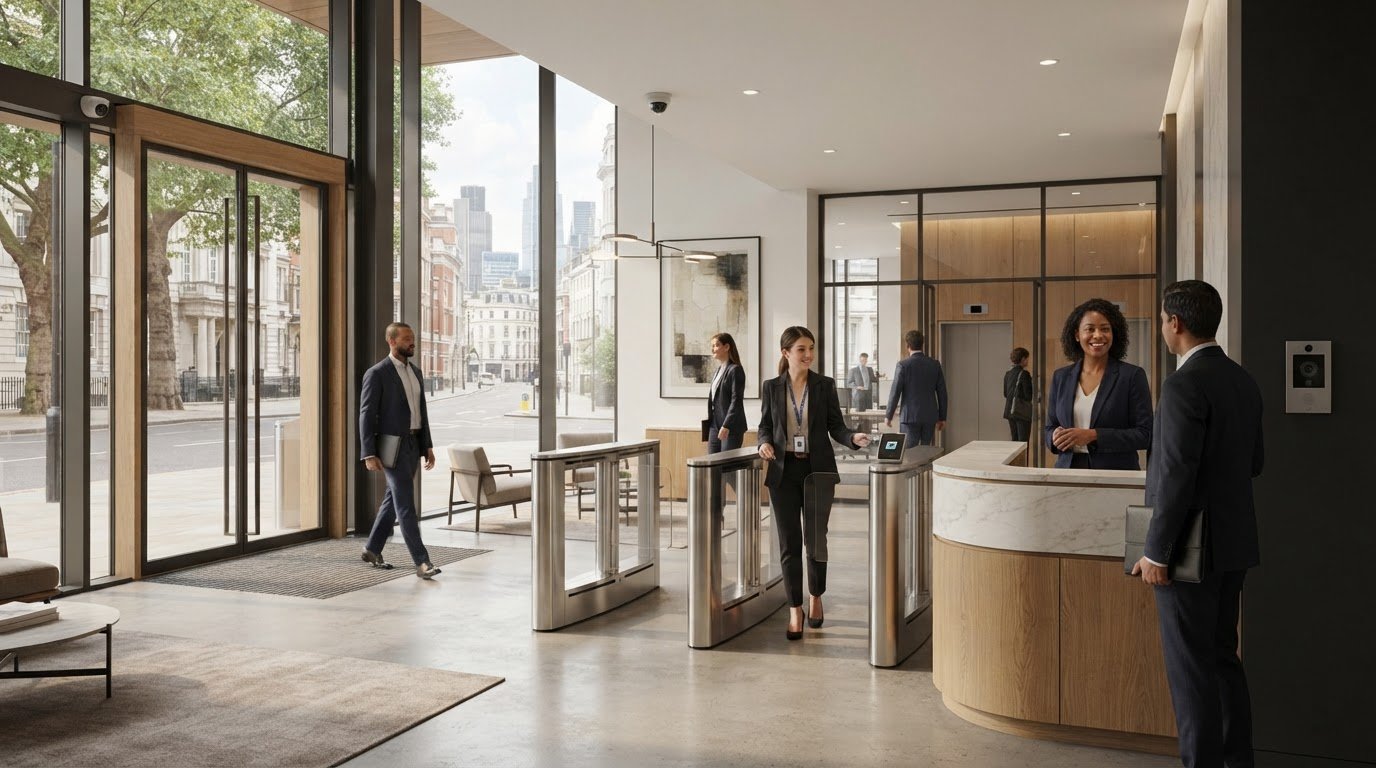
A secure London office should protect people and confidential work without making every arrival feel like a checkpoint. Choosing security solutions for professional services firms London means balancing controlled access with a welcoming, efficient workplace. That balance matters when staff, clients and other visitors move through reception, meeting rooms and restricted areas throughout the day.
Access control, IP video intercoms, speed gates and barriers, and IP HD CCTV each address different needs. The right combination depends on how your office operates, where access needs to be restricted and how visitors are received. A coordinated system should support these routines without adding unnecessary friction.
This guide offers a practical way to compare physical security options and plan how they work together. It also covers system integration, professional commissioning, planned maintenance and key data protection considerations for CCTV. Use it to shape a solution around your workplace and its day-to-day routines.
Key Takeaways
- Map entrances, visitor flows and restricted areas to identify which physical security measures fit your workplace.
- Compare access control, IP HD CCTV, video intercoms and speed gates by the specific role each needs to perform.
- Assess whether connecting access and video workflows could make visitor management and incident review more straightforward.
- Plan the project from requirements and design through installation, commissioning and handover, taking account of an occupied office.
- When comparing security solutions for professional services firms London, consider how system design, a documented handover and planned maintenance support reliable operation over time.
What security solutions do London professional services firms actually need?
Choosing security solutions for professional services firms London means looking at how people enter, move through and use the workplace, rather than starting with a list of equipment. Physical security measures help manage access to premises and provide visibility of activity in selected areas. Options include access control, IP HD CCTV, IP video intercoms, and speed gates or barriers. Physical security covers these concepts alongside other measures that protect people, property and places.
These are installed systems, not guarding services or cybersecurity software. They can help manage entry and provide visibility around a site. Guarding involves people, while cybersecurity software protects digital systems. Keeping these roles distinct helps define what a physical security project should address.
Which physical security risks matter in a professional workplace?
Start with how the premises are used. A client meeting room may need different access arrangements from a staff-only work area. A shared reception also creates different entry considerations from a single-tenant office. Unauthorised entry, tailgating through a controlled doorway and access to restricted rooms are useful risks to consider, but priorities vary by firm and site.
Map the journeys people take through the building. Consider staff arriving and moving between floors, clients checking in for appointments, contractors attending work and deliveries reaching their intended point. Mark where routes cross, where access should be limited and which areas need greater visibility. This gives you a practical basis for matching the system to the layout and operating patterns, rather than assuming every London firm needs the same equipment.
How should security support a professional client experience?
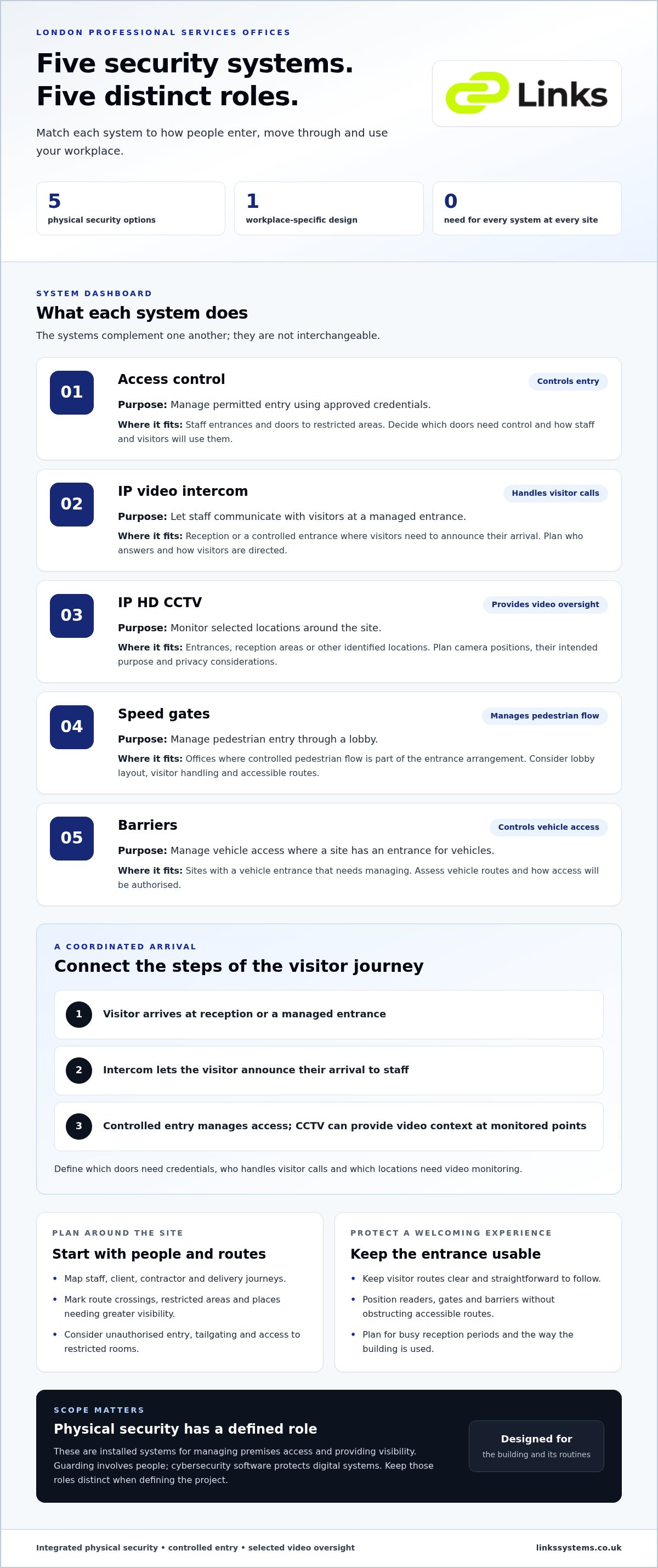
Security should make entry procedures clear without creating unnecessary friction. For example, a visitor may go to reception, use an intercom to announce their arrival and then be admitted through a controlled entrance. Staff access can be managed separately, while restricted areas remain outside visitor routes. The right process depends on the building, accessibility requirements and how reception operates.
Plan equipment placement alongside the visitor journey. Readers, gates and barriers should not obstruct accessible routes or make reception difficult to navigate. Consider how a client will know where to go and how staff will manage entry when reception is busy.
Integrated physical security connects controlled entry and video oversight to the way people use a professional workplace, helping manage access while supporting a welcoming client experience. Start with the site layout, assessed risks and daily workflows. The design might use a small number of coordinated measures or a broader system where the premises and access requirements call for it.
How access control, CCTV and intercoms work together in London offices
Each system has a distinct role. Access control manages who can enter selected doors or areas. IP video intercoms let staff communicate with visitors at a managed entrance, while IP HD CCTV provides video monitoring of chosen locations. Speed gates manage pedestrian passage, and barriers can control vehicle access where the site requires it. Integration can coordinate these functions, but the design still needs to reflect the building and its operating needs.
| System | Purpose | Suitable application | Integration role and planning consideration |
|---|---|---|---|
| Access control | Manage permitted entry using approved credentials | Staff entrances or doors to restricted areas | Can coordinate entry permissions with other systems. Plan which doors need control and how staff and visitors will use them. |
| IP video intercom | Support communication at an entry point | Reception or a controlled entrance where visitors need to announce their arrival | Can complement access control by helping staff assess a visitor’s request before entry. Decide who will answer and how visitors will be directed. |
| IP HD CCTV | Provide video monitoring of selected areas | Entrances, reception areas or other locations identified for monitoring | Can add video context alongside access activity. Plan camera locations around the site, their intended purpose and privacy considerations. |
| Speed gates | Manage pedestrian entry through a lobby | Offices where controlled pedestrian flow is part of the access arrangement | Can form part of a coordinated entrance. Consider lobby layout, visitor handling and accessible routes. |
| Barriers | Control vehicle access | Sites with a vehicle entrance that needs managing | Can be considered alongside pedestrian entry arrangements. Assess vehicle routes and how access is authorised. |
Which system controls entry, verifies visitors and records activity?
Think of the systems as complementary, not interchangeable. A staff member’s credential may permit access through a selected door; a visitor can communicate with reception through an intercom; and CCTV can provide video context at monitored points. Together, these functions can support a clearer entry workflow. When planning the system, specify which doors require credentials, who handles visitor calls and which locations need video monitoring. For network-connected equipment, account for the wider security of the network as part of the project. GOV.UK’s cyber security guidance for business provides relevant guidance on protecting business systems.
When are speed gates or barriers appropriate for an office?
Speed gates may suit a lobby where pedestrian entry needs to be managed in an orderly way. They are not automatically right for every reception. Consider available space, visitor flow and accessible routes before including them in the design. Barriers are relevant where a firm needs to control vehicle entry, rather than as a default feature of an office security scheme. For more detail on specification considerations, see the commercial speed gates specification guide.
For security solutions for professional services firms London, integration is most useful when it supports a defined workflow, such as staff entry, visitor admission and video review. Links Integrated Systems designs, installs, commissions and maintains physical security systems for commercial environments. Explore integrated physical security systems to see how a coordinated system can be planned around the workplace.
How to compare security solutions for your professional services firm
Compare systems against the work they need to support, not the number of features in a brochure. Start with the site: its entrances, reception arrangements, staff and visitor routes, and areas where access needs to be controlled. This gives you a practical basis for assessing security solutions for professional services firms London and keeping the proposed equipment relevant to the workplace.
What should a security system specification cover?
Record the main user groups and how each enters and moves through the premises. Include staff, clients, contractors and delivery personnel, along with the process for receiving and directing visitors. Note restricted rooms, existing equipment and any known gaps or limitations. For each proposed system, state its intended role, such as managing staff entry at a particular door or providing video monitoring at a selected location. The physical security integration guide offers further context for planning systems as part of a building.
- Access points: identify entrances and internal doors where access needs to be managed.
- People and processes: document visitor arrival, staff access and who handles entry decisions.
- Restricted zones: mark areas that need different access arrangements from reception or shared spaces.
- Existing infrastructure: record what is already installed and how any new equipment should relate to it.
- Operation and upkeep: consider who will use the system, how it will be commissioned and what maintenance it will need.
This exercise helps distinguish standalone equipment from an integrated access and video workflow. Standalone systems may suit a clearly defined task. Integration can help staff relate an access event to video from a relevant monitored area. Neither approach is automatically preferable. Choose based on the site, the operating process and the value of coordinating those functions.
How can firms assess access management and video integration?
Describe the user journey from arrival to authorised entry, then specify who is responsible at each step. For example, clarify who receives an intercom call, how staff credentials are managed and who may review CCTV footage. These responsibilities help show whether the proposed system will work in practice, not just on a plan.
Cloud-based management may suit some operating models, but it is not essential for every firm. Consider how the system will be administered and whether its management approach fits the organisation’s routines. The cloud access control guide for business explains points to consider. Assess usability, commissioning and ongoing maintainability alongside the equipment itself. A useful specification follows the firm’s requirements, not a generic ranking or feature count.
What happens during security system installation and commissioning?
A well-managed security project moves from understanding the site to confirming that the installed equipment works as intended. For a London office, planning also needs to account for occupied areas, staff routines and visitor routes. The scope and sequence depend on the premises, so let the requirements guide the work rather than assuming a standard package or timeline.
The project typically follows five stages:
- Requirements: identify the access points, operational needs and areas covered by the proposed system.
- System design: define equipment locations, how the components relate to one another and how the arrangement supports daily use.
- Installation: fit the agreed hardware, coordinating work around affected routes and occupied spaces.
- Commissioning: check that the installed systems operate in line with the agreed design.
- Handover: provide the information needed to understand the system and its operation, with responsibilities made clear.
How is an office security project planned around daily operations?
Before installation, map where work will take place and how staff and visitors use those areas. A reception entrance, staff doorway and restricted meeting area may have different access requirements, so plan installation activity with those routes in mind. Consider equipment locations and system interfaces together, making the intended operation clear before work begins. A documented handover should explain the installed arrangement and who manages day-to-day responsibilities.
Planning can identify where work may affect an occupied area or visitor journey, allowing the project sequence to reflect the premises’ operating patterns. The details should be tailored to the site. For security solutions for professional services firms London, this connects the technical design with the practical demands of a working office.
Why do commissioning and maintenance matter after installation?
Installation alone does not establish that a system performs as specified. Commissioning checks the completed equipment against the agreed design, including its intended operation and the relationship between connected components. This provides an opportunity to address issues before handover and helps ensure the system is set up for its stated purpose.
Ongoing care matters too. Scheduled maintenance gives commercial security infrastructure planned attention and keeps equipment under review. The CCTV and access control integration guide explores how these systems can be planned together.
Links Integrated Systems designs, supplies, installs, commissions and maintains physical security hardware for commercial environments. Explore security system installation for an approach planned around your workplace requirements and operating routines.
Choosing a London physical security partner for long-term support
A physical security project does not end when equipment is installed. For professional firms, dependable operation also relies on a clear design, coordinated delivery, commissioning and ongoing maintenance. Working with a provider responsible across these stages helps keep the agreed requirements connected from initial planning through to handover and scheduled support.
When reviewing project support, consider whether the work covers:
- System design: defining an arrangement around the building, access requirements and workplace routines.
- Supply and installation: providing and fitting the agreed physical security hardware.
- Commissioning: checking that installed systems operate in line with the design.
- Handover: documenting the system and clarifying operational responsibilities.
- Maintenance: arranging ongoing attention for the installed infrastructure.
Clear project ownership helps keep decisions, interfaces and site requirements aligned. A documented handover gives the organisation a useful reference for how the system is arranged and managed. That continuity matters when staff responsibilities change or workplace access needs evolve.
What does end-to-end physical security project support look like?
Links Integrated Systems works with commercial environments across London, designing, supplying, installing, commissioning and maintaining physical security hardware. Systems can include access control, IP HD CCTV and IP video intercoms, with speed gates or barriers where site access requirements call for them. The right mix depends on the premises, rather than a standard set of equipment for every firm.
Commissioning checks the installed arrangement against the agreed design, while scheduled maintenance supports the system beyond installation. Together, these stages provide a structured approach to delivery and ongoing care. For security solutions for professional services firms London, the project can be planned around workplace requirements and supported through its operational lifecycle.
How can London firms take the next step?
Before discussing a project, outline the site’s access points, the journeys staff and visitors take, and the areas where access needs to be managed. Note existing security equipment and the operational requirements a new system should address. These details help focus the discussion on physical security solutions suited to the commercial workplace, whether the project involves a new installation or changes to existing arrangements.
Links Integrated Systems can review your project requirements and discuss physical security systems for your commercial workplace.
Plan a security system around your workplace
The right physical security arrangement starts with your premises: how staff and visitors move through it, which areas need controlled access and where video monitoring may support day-to-day oversight. Access control, IP HD CCTV and IP video intercoms each serve a distinct purpose. Their value depends on how well they fit your workplace and work together.
For firms comparing security solutions for professional services firms London, look beyond equipment selection. A considered project includes installation, commissioning and scheduled maintenance, carrying the agreed design through to ongoing support. Links Integrated Systems works with commercial environments across London, Kent, Surrey, Hertfordshire and Essex.
Whether you are planning a new system or reviewing existing arrangements, a clear understanding of your site and operational needs is a useful first step. Discuss physical security solutions for your London workplace with Links Integrated Systems.
Frequently Asked Questions
What security systems does a professional services firm need?
There is no single combination that suits every professional services firm. Access control can manage entry to selected doors or areas, IP CCTV can provide video monitoring, and IP video intercoms can support communication with visitors at entry points. Speed gates may suit some busy lobbies. To choose suitable security solutions for professional services firms London, consider the building layout, user journeys, operating requirements and assessed risks.
How can access control and CCTV work together in an office?
Access control manages permissions at selected doors, while CCTV provides video monitoring of chosen areas. When designed to work together, the systems can help staff understand access activity alongside relevant video. The specification should set out how the systems interact, who is responsible for using them and how recorded footage is managed. A site-specific plan is more useful than assuming every office needs the same configuration or integration.
Are speed gates suitable for a professional services office?
Speed gates may suit an office where managed pedestrian entry and lobby flow are important. Their suitability depends on the building layout, expected movement, reception process and accessibility needs. They are not essential for every firm. Consider how staff, clients and other visitors will enter and move through the workplace, and how the gates fit the wider access plan. The aim is to manage entry without creating unnecessary obstacles to a professional welcome.
What should a London firm consider when planning CCTV?
Begin by defining the purpose of the CCTV system and the areas it is intended to monitor. Consider camera locations, who can access recorded footage and who is responsible for managing it. CCTV use may involve data protection obligations, depending on the system and how footage is handled. Firms should assess their own circumstances and consult current Information Commissioner’s Office guidance where relevant, rather than relying on a blanket assumption about requirements.
Can a new security system integrate with existing equipment?
Integration may be possible, depending on the existing equipment, proposed systems and project requirements. A planned design should document current infrastructure, intended interfaces and the operational outcomes the firm needs. Links Integrated Systems works with access control, IP CCTV, video intercoms, speed gates and barriers, alongside commissioning and maintenance. Its commercial project coverage includes London, Kent, Surrey, Hertfordshire and Essex, supporting firms across the region with physical security system projects.
Why is commissioning important for an office security system?
Commissioning checks that installed equipment operates in line with the agreed system design. It allows relevant functions and system interfaces to be reviewed before handover, connecting installation with day-to-day use. Handover information can also clarify how the system is arranged and who is responsible for its operation. This is part of a considered project lifecycle, rather than treating equipment installation as the final step.
How often should commercial security systems be maintained?
Maintenance frequency depends on the equipment, site operations and arrangements agreed for the project, so there is no universal interval. Scheduled maintenance gives security equipment and system functions planned attention, supporting reliable operation over time. Firms should keep records of system responsibilities and maintenance activity. Links Integrated Systems provides scheduled maintenance for commercial security infrastructure, including for businesses in London and surrounding counties.