
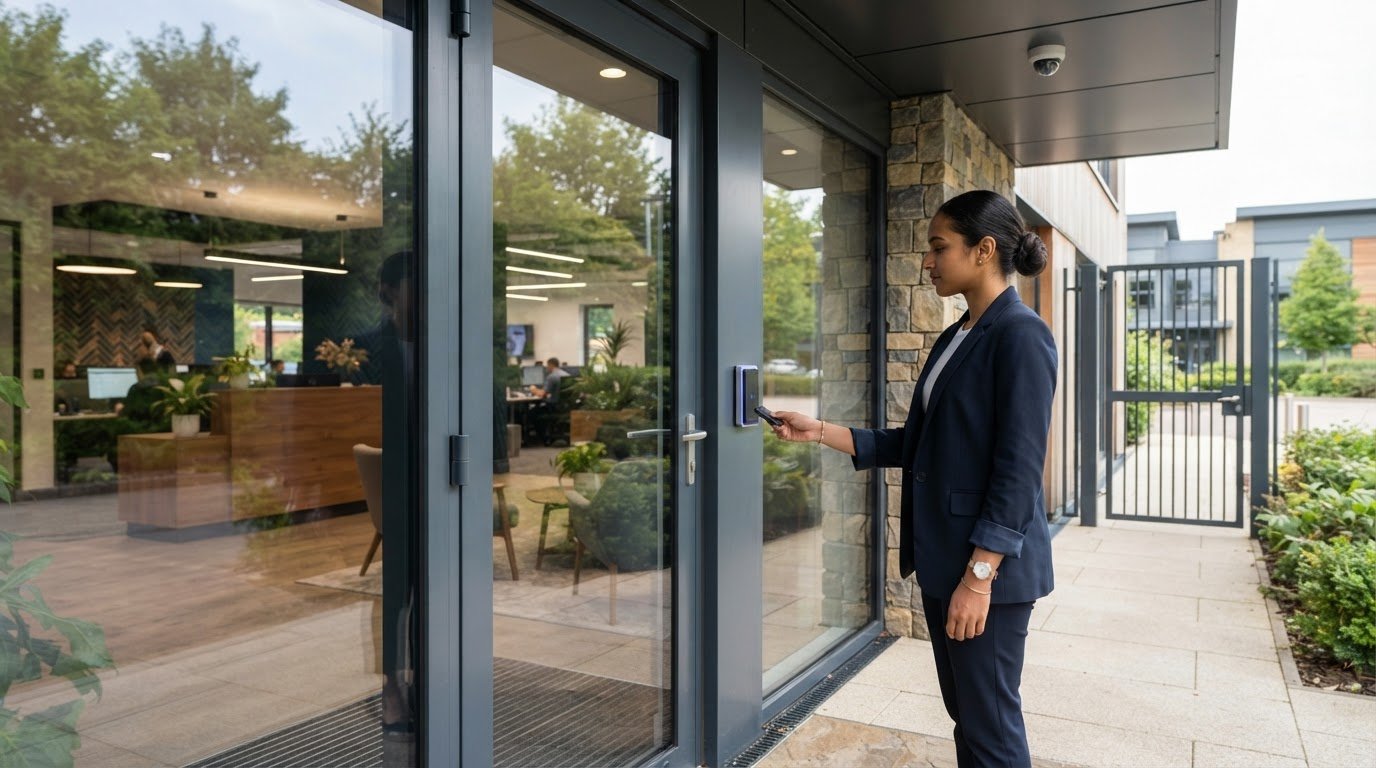
A key or open door doesn’t show who entered, which areas they could access or when permissions changed. The best access control for a small business in Surrey is a system matched to its entrances, staff permissions and audit needs, with the option to link doors to gates, alarms or CCTV. Access control uses credentials such as cards, fobs or codes to manage entry and record activity.
It is reasonable to want a system that improves security without making everyday access harder to manage. The right setup gives people access only to the areas they need while keeping entry records available for review.
This guide explains how access control works, how permissions and audit trails are managed, and what to consider when choosing a system for a small business. It also covers how access control can work alongside gates, alarms and CCTV, so you can assess the options against your premises and day-to-day requirements.
Key Takeaways
- Map your entrances and restricted areas first to identify what the access control system needs to manage.
- Set permissions around each person’s role, then use activity logs to review access events.
- Plan how doors, gates, alarms and CCTV should work together to support your site’s security procedures.
- Choose credentials and door-release settings that suit how staff and visitors use your premises.
What is Access Control?
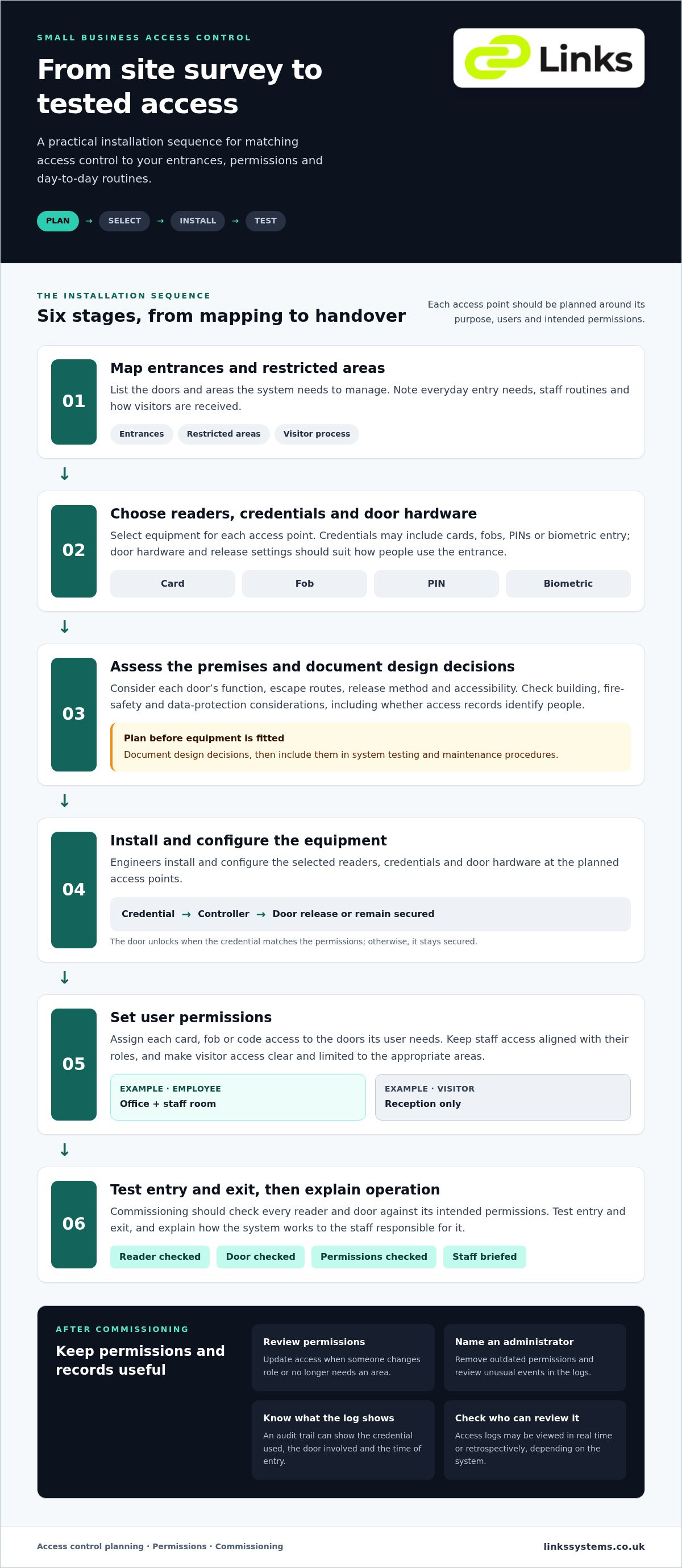
Access control determines who may enter a building, which doors they can use and when. A card, fob, PIN or biometric reader sends a credential to a controller. If the permissions match, the door unlocks; otherwise, it stays secured. For example, staff might enter an office while visitors use an entrance managed by reception. Choosing the best access control for a small business in Surrey starts with these everyday entry needs.
When choosing an installer in Surrey, compare their approach to site assessment, system design, commissioning and ongoing maintenance. Assess how the proposed system will suit your doors, staff routines and visitor process, rather than choosing by reader type alone. The same considerations apply to commercial access control installation in Surrey and London.
Installation follows a defined sequence. First, map entrances and restricted areas. Next, select readers, credentials and door hardware for each access point. Engineers then install and configure the equipment, set user permissions, test entry and exit, and explain system operation to responsible staff. Commissioning should check each reader and door against its intended permissions.
For UK commercial premises, assess building, fire-safety, accessibility and data-protection considerations during design. Relevant factors include each door’s function, escape routes, release method and whether access records identify people. Document design decisions before installation, then include them in system testing and maintenance procedures.
There is no universal monthly fee for cloud-based access control. Costs depend on the project, including the number of doors, selected hardware, software functions and ongoing support.
Look for an access control design in Surrey that fits your site and includes installation, commissioning and maintenance. Compare the proposed system with practical needs, such as separate staff and visitor access, biometric entry or permission changes when roles shift. To find the best access control for your small business in Surrey, weigh these requirements against your premises and daily routines.
Access permissions and audit trails
Permissions define which doors each credential can open; audit trails record access activity. Set them around staff roles, visitor arrangements and the areas that need controlled entry. For a small business in Surrey, the best access control keeps these rules clear and manageable as work routines change.
Access logs and user permissions
Configure each card, fob or keypad code for the doors its user needs. For example, an employee may enter the office and staff room, while a visitor receives access only to reception. Management software lets administrators adjust permissions when responsibilities change or restrict a credential after it is reported missing.
Electronic access logs can be viewed in real time or retrospectively, depending on the system. Check which events appear and who can review them. A useful audit trail helps an authorised administrator identify the credential used, the door involved and the time of entry, without giving every user administrative access.
Permissions and safety
Access settings should support safeguarding as well as restrict entry. Give staff access only to the areas required for their work, and make visitor entry clear for reception or another responsible person. A keypad may suit a shared entrance, while individually assigned credentials can help distinguish users in access records.
Review permissions when someone changes role or no longer needs access to an area. This keeps entry rights aligned with current duties. Consider how staff and visitors move through the premises, and make sure procedures remain clear in daily use and when a door must be used quickly.
Include access reviews in staff-change and site-update procedures. Assign a named administrator to remove outdated permissions and examine unusual events in the logs. Apply the same process across offices, storage areas and controlled spaces, so changes are not missed at one door. When assessing the best access control for a small business in Surrey, consider whether administrators can apply these steps consistently. Explore access control systems as part of planning how credentials and audit records should work together.
Integrating access control with gates, alarms and CCTV
Integration connects access events with other security measures, helping a business manage entry as a coordinated process. For example, a valid credential can release a controlled door or gate, while an intercom lets reception speak with visitors before admitting them. Decide which entrances need controlled access, who authorises visitors and what each system should record.
Access control can work alongside alarms and CCTV, bringing different security solutions into one site plan. CCTV can monitor an entrance, while access records show which credential was used at that door. If an alarm system is also connected, define how the systems should respond to relevant events. Plan these functions around the premises and staff procedures, rather than assuming every device needs to be linked.
Time-and-attendance integration can use access events to record when employees arrive and leave. This may suit a business that wants to consider entry activity and attendance records together. Before selecting this arrangement, decide which doors represent an employee’s arrival or departure for work. A staff entrance may provide a clearer record than a shared visitor entrance.
Remote management can help an authorised administrator change access permissions without attending each door. For example, a manager could update a user’s access through the system software when work responsibilities change. Set clear rules for who may make changes and review the electronic records afterwards. Integration should make responsibilities easier to follow, not obscure which system controls a door or creates a record.
During planning, list every door, gate, intercom, CCTV camera and alarm function that needs to work together. Then define the intended response for a valid entry, a visitor call and an unexpected event. Test each agreed sequence during commissioning. This helps identify mismatches, such as a gate releasing without the intended visitor process or CCTV covering a different entrance. A joined-up design should reflect actual movement through the site.
Access control for businesses
The right system depends on your premises, entry points and staff routines. For a small office with one controlled entrance, a keypad may be practical; a site with several doors may benefit from electronic credentials and central permission management. Industrial premises may also need controlled vehicle or staff access. Residential entry has different users and routines, so business requirements should guide the design.
Types of access control include mechanical keypads, electronic card or fob readers, and intercom-based door entry systems. Mechanical keypads need no power or wiring, making them useful for gates, outbuildings or places where cabling is impractical. Electronic credentials can be assigned to individuals, while an intercom lets staff speak with visitors before deciding whether to admit them.
Choose an option to suit a practical task. If staff need access only during working hours, set permissions for specific times. If a card or fob is lost, it can be deactivated without changing the locks. Where users need to manage entry remotely, select a system with remote access features and define who can administer permissions.
Door hardware also matters. Electric locks can be set to release on power failure or remain locked, depending on the required fail-safe or fail-secure arrangement. Consider the door’s role, normal movement through the premises and the intended response during a power interruption. Include these requirements in the system design and test the chosen behaviour during commissioning.
For the best access control for a small business in Surrey, prioritise fit over complexity: identify entrances, user groups, access times and visitor procedures. Then compare mechanical, electronic and intercom options against those needs. Businesses across Surrey can discuss their access requirements as a practical next step.
Links Integrated Systems: Speed Gates & Barriers
Links Integrated Systems helps Surrey businesses plan access control around their entrances, staff and visitor procedures. Its services include Speed Gates & Barriers, Access Control Systems, IP Video Intercom Systems and IP HD CCTV Systems. These can form part of a coordinated security arrangement for premises where controlled entry and clear oversight are priorities.
Discuss your requirements when planning a new installation, changing how people enter the site or bringing access and video systems together. System commissioning and maintenance also support the operational life of security infrastructure.
Contact Links Integrated Systems to discuss access control for your business, or visit linkssystems.co.uk.
Plan the next step for your premises
Choosing the best access control for a small business in Surrey starts with a practical question: what should happen at each entrance, and who is responsible for managing it? Use the answer to guide a site-specific discussion, so the system supports daily operations as well as security objectives.
Links Integrated Systems can help plan around its Speed Gates & Barriers, Access Control Systems and IP Video Intercom Systems. Consider how staff, visitors and deliveries move through the premises, then identify where controlled entry or clearer communication would make the greatest difference.
A considered design gives you a clear foundation for the next stage, whether you are planning a new installation or reviewing existing arrangements. Contact Links Integrated Systems to discuss your business’s access control requirements and take a measured next step towards a system suited to your premises.
Frequently Asked Questions
Can I let visitors in from my phone?
Yes, an IP video intercom system can let you speak with visitors at a door or gate and admit them remotely. For example, a manager away from reception can answer a visitor’s call and decide whether to release the entrance. Remote entry depends on the installed system and site configuration. Set a clear process for staff to handle unanswered calls and unexpected visitors.
Looking for Security Systems & Services in Surrey?
Links Integrated Systems works with commercial and professional environments across Surrey, London, Kent, Hertfordshire and Essex. Its physical security offerings include access control, IP video intercom, IP HD CCTV, and speed gates and barriers. Before discussing a project, consider which entrances, visitor procedures or site areas need attention. This helps focus the conversation on practical requirements for your premises.
What happens if someone loses a fob or card?
Report a missing credential to the system administrator promptly so its access can be revoked. An authorised replacement can then be issued with permissions suited to the user’s role. Review recent access records for activity that needs attention, and update any credential register used by your business. Electronic credentials can be deactivated without replacing door locks, avoiding disruption to other users.
How do key cards, fobs, PIN codes, mobile credentials and biometrics compare?
Cards and fobs provide individually assigned credentials that users present at a reader. A PIN avoids carrying a token, but users must keep the code private. Mobile credentials use a phone for entry, while biometric systems identify a physical characteristic. Choose according to user routines, entry points and how easily administrators need to issue, change or revoke access.
What are the risks of access control system failures, lost credentials and cyberattacks?
A failed reader, controller or power supply can interrupt normal entry, while a lost credential may be misused before it is removed. Network-connected systems also require careful management of administrator access. Define a staff procedure for reporting faults and missing credentials, restrict system administration to responsible users, and include functional testing and maintenance in the security plan. Keep a clear alternative entry process for disruptions.
Can access control integrate with alarms, CCTV and existing door hardware?
Yes, access control can be combined with CCTV, gates, door-entry equipment and alarm systems. Integration depends on the equipment and the intended site operation. For example, CCTV may show an entrance whilst access records identify the credential used. Existing locks and door hardware also affect the design, so document the required release behaviour and test each connected function during commissioning.