

The strongest security improvement may be a better plan, not another device. If you’re considering how to improve office building security in Kent, start by assessing the building’s risks and access points, then set clear controls for entry, CCTV coverage and routine maintenance. Budget for the ongoing management and upkeep of security systems from the outset.
Effective security depends on how well its measures work together. Access procedures, cameras and staff practices each play a part, and the right priorities depend on the building, its occupants and the risks it faces.
This guide sets out practical steps to strengthen office security, from reviewing entrances and covering vulnerable areas to planning inspections and maintenance. It also explains how to account for ongoing requirements in your security budget, so the measures you choose can be managed over time as well as installed.
Key Takeaways
- Start with a risk assessment that maps entrances, sensitive areas and how people move through the building.
- Plan CCTV coverage around entrances, exits and blind spots, and include secure footage storage in your procedures.
- Schedule routine inspections and system maintenance to identify faults and keep security measures working as intended.
- Consider whether gates, visitor controls or an on-site security presence suit the building’s access needs and level of risk.
- Budget for the ongoing management and maintenance of security systems, not just their initial installation.
1. Why is access control important for my building?
Access control helps distinguish authorised entry from unauthorised access, particularly where staff, visitors and suppliers use the same entrance. Begin with a property risk assessment: map each entrance, delivery point, shared corridor and sensitive room. Record who needs access, when they need it and what could be exposed if an unauthorised person enters. This provides a practical basis for choosing controls proportionate to the building’s risks.
Check how people actually move through the office. Reception may be staffed during the day, while a side door or car park entrance may be quieter. Note doors that are often held open, routes from reception to private offices, and access to server or records rooms. These observations help identify where a physical barrier, controlled door or staff procedure could reduce risk while keeping entry convenient for authorised users. In areas where exterior glazing or internal glass partitions leave confidential operations exposed, protective and privacy window films supplied by specialist distributors such as SolControl can also reinforce physical security alongside electronic entry systems.
Keycards and biometric systems can restrict entry to authorised personnel. Choose permissions according to role, rather than giving every employee access to every room. For example, staff may use their credentials for the main office, whilst only designated personnel can enter a records area. Electronic access control can also schedule staff access until 5 or 6 p.m., whilst cleaners receive after-hours access. Set permissions to reflect working patterns, then review them when roles change.
How can offices prevent tailgating and unauthorised entry? Pair controlled doors with a clear reception process: visitors should sign in, provide identification on arrival and be accompanied inside. Train staff not to let an unknown person follow them through a secured door, even if that person seems familiar with the building. A staffed entry point or video intercom can help reception identify visitors before granting entry, while visitor passes can limit access to meeting rooms and keep private offices off-limits.
What are the legal requirements for workplace security and fire safety in England? Employers have a duty under health and safety law to provide a safe working environment for employees and visitors. Office fire alarms should also be maintained regularly. Assess access risks alongside safety arrangements, ensuring entry controls do not obstruct escape routes or emergency procedures.
Electronic entry and exit logs can show movement through a commercial building and support accountability. Use them to review access patterns, investigate unexplained entry and identify credentials that need updating. Establish a process for lost or stolen cards, keys and access codes so permissions can be withdrawn and replaced promptly. An access system is an effective deterrent only when permissions, visitor procedures and staff behaviour work together.
2. Place CCTV to cover entrances, exits and blind spots
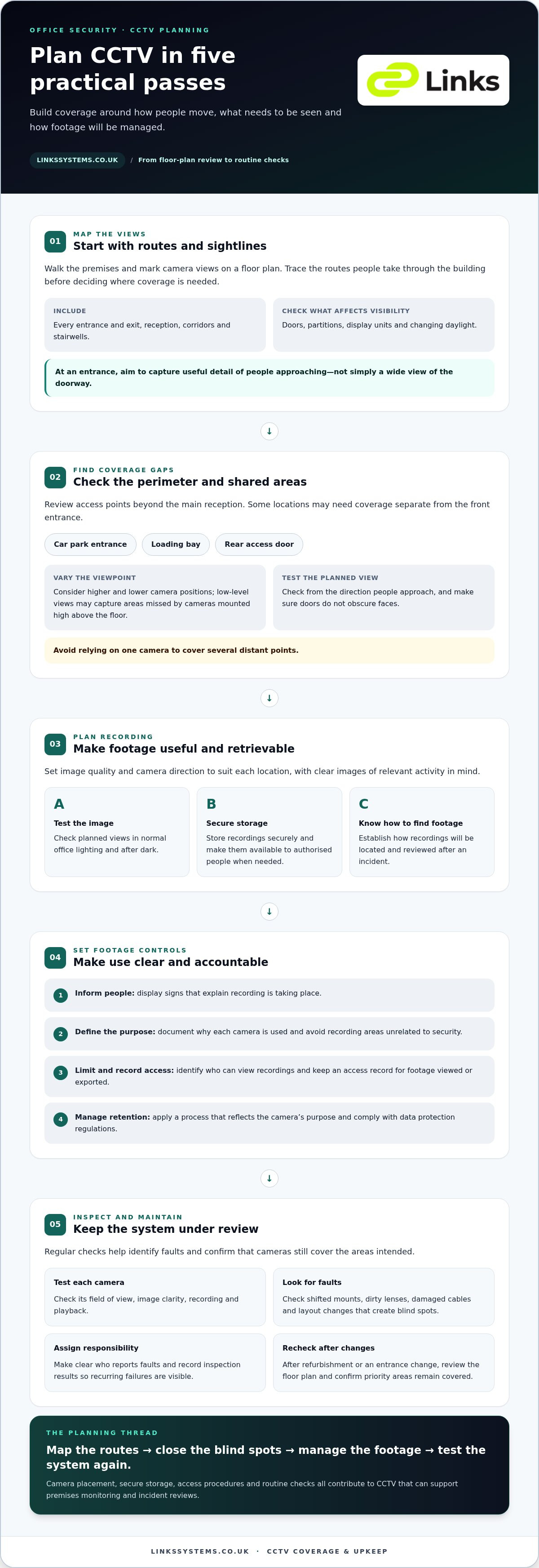
Start by walking the premises and marking camera views on a floor plan. Include every entrance and exit, then trace the routes people take through reception, corridors and stairwells. Check how doors, partitions, display units and changing daylight affect visibility. A camera aimed at an entrance should capture useful detail of people approaching, not just a wide view of the doorway. Mapping the views helps reveal blind spots before installation.
Next, review the external perimeter and shared areas. A car park entrance, loading bay or rear access door may need coverage separate from the main reception. Consider camera angles at higher and lower positions, since low-level cameras can capture views missed by cameras mounted high above the floor. Avoid relying on one camera to cover several distant points. Test planned views from the direction people approach and check that doors do not obscure faces.
Plan recording as well as camera placement. CCTV footage can provide evidence after an incident, so cameras must capture clear images of relevant activity. Set image quality and camera direction to suit each location, then test the views in normal office lighting and after dark. Store recordings securely and make them accessible to authorised people when needed. Limit access to people with a defined responsibility, and establish how footage will be found and reviewed after an incident.
Businesses using CCTV should display signs informing people that recording is taking place. Video storage and use must comply with data protection regulations. Set a clear purpose for each camera, document who can view recordings, and apply a retention process that reflects that purpose. Avoid recording areas unrelated to security. A straightforward access record can show who viewed or exported footage, supporting accountability when a recording is used in an investigation.
Keep the system under review. Test each camera regularly, including its field of view, image clarity, recording and playback. Check for shifted mounts, dirty lenses, damaged cables or office layout changes that create blind spots. After a refurbishment or entrance change, review the floor plan again and confirm that priority areas remain covered. Assign responsibility for reporting faults and record inspection results so recurring failures are visible. This routine helps CCTV support premises monitoring and incident reviews, including those that require an emergency response.
3. Routine inspections and security system maintenance
Use a recorded inspection routine to find faults before they weaken building security. Walk the site and examine doors, frames, locks, access readers, intercoms and camera mounts. Look for loose fittings, damaged locks, blocked views and doors that fail to close properly. Regular inspections can identify weak doors and damaged locks before they become vulnerabilities. Record the location, fault and action taken, then track unresolved issues until they’re addressed.
Test each security system through its normal user process. For example, present an authorised access card at a reader, check that the correct door releases, then confirm access is denied when an unauthorised credential is used. Test intercom calls from the entrance to the intended reception point. Review CCTV live views and playback, and check that recorded footage remains clear. These checks can reveal faults that a visual inspection alone would miss.
Plan system design around the building’s layout and daily use. In a new office, coordinate access points, camera positions, reception and emergency routes before installation begins. In an existing building, survey current equipment and note changes such as new partitions, entrances or tenant areas. This helps identify gaps and avoid placing equipment where walls or routine activity obstruct its function. Keep an updated plan showing devices, controlled doors and responsible staff.
- Inspect doors, locks and door closers for damage or unreliable operation.
- Test access control systems using authorised and unauthorised credentials.
- Check intercom communication and CCTV live views and recordings.
- Record faults, remedial work and changes to the building layout.
Include emergency communication in the building’s response planning. Procedures can set out how staff report an incident, who receives the message and how occupants are directed to a safe area. Emergency plans may include panic buttons and mass notifications by text message or email. Practise the process so employees know how to respond, and update contact arrangements when staff responsibilities change.
Make maintenance part of the inspection record, rather than a task considered only after equipment fails. Review completed work, recurring faults and changes to access requirements together. Fire alarms in UK office buildings should be maintained regularly, so include them in the wider safety schedule. A consistent review process supports reliable operation and helps keep security arrangements aligned with current threats and how the premises are used.
4. Consider gates, security guards and warning signs
A gate can help prevent and deter unauthorised entry to an office property. First, identify which vehicle or pedestrian approaches need control, such as a staff car park, loading area or side entrance. Match the gate position to the site layout, keeping authorised routes clear and emergency access unobstructed. Consider how deliveries, visitors and employees will enter during normal operations, rather than treating the gate as a standalone measure.
Speed gates and barriers can form part of a managed entry point where vehicle or pedestrian movement needs control. Plan how authorised users will pass through, where visitors will report, and how staff will respond if access is refused. Pairing a physical boundary with clear entry procedures makes arrivals and departures easier to manage. Keep the approach well lit so staff can see people and vehicles arriving, especially during darker periods.
On-site security personnel may be useful at properties with frequent suppliers, deliveries, visitors and customers. Their role can include observing arrivals, directing visitors to reception and reporting unusual activity through agreed procedures. Mobile patrols offer a different approach, with personnel moving around the property rather than staying in one place. For high-risk periods or during system downtime, specialised teams such as Fire Watch Service deliver dedicated physical patrols to maintain site safety and protection. Decide which areas and operating periods need attention, and define how staff should report breaches or contact the relevant response team.
How should businesses choose a security company in Kent? Start by defining the site’s needs, such as gate oversight, visitor handling, patrol coverage or incident reporting. Set out the required duties, locations and escalation process clearly, then choose arrangements that match the building’s access patterns and risks.
Warning signs can tell people that security measures are in place and unauthorised entry may have consequences. Position signs where they can be seen before someone reaches an entrance or restricted area. Keep their wording consistent with the measures operating on site. For example, a sign referring to CCTV should correspond with cameras recording that location, rather than create a misleading impression.
Consider how gates, guards, signs, lighting and alarms work together. A gate may control vehicle access, while reception manages visitors and a guard monitors a busy delivery point. Warning signs can reinforce these controls, but they don’t replace a working entry process. Where an office needs cover around the clock, assess whether security arrangements should operate for 24 hours. The decision depends on occupancy, access activity and the consequences of an unattended breach.
Before changing the perimeter, map entrances, pedestrian routes and delivery movements. Record who is responsible for operating access points and responding to faults. These practical details help businesses select suitable security arrangements without disrupting daily office activity.
5. Set a security budget, including maintenance
A security budget should cover the full life of each measure, not just installation. A lifecycle-based budget helps Kent businesses plan how to improve office building security, from initial design through ongoing upkeep. Separate planned expenditure into equipment, installation, staff procedures, inspections, repairs and future replacements. For example, a new camera system also needs secure footage storage, regular testing and a process for resolving faults. Include these recurring needs before approving the project, so essential upkeep isn’t left without funding.
Start with a risk-based priority list. Identify the assets needing protection, the sensitive areas they occupy and the consequences of unauthorised entry. A building storing valuable equipment may prioritise controlled access to storage rooms, while an office handling confidential records may focus on restricted document areas. Rank each risk by its potential impact and the effectiveness of the proposed measure. This directs funding towards relevant weaknesses and helps decision-makers explain why each item belongs in the plan.
Build the budget around practical cost headings, without treating every control as a separate purchase. Include surveys and system design, installation work, staff training, maintenance visits, replacement parts and secure data storage. Account for disruption during installation, such as arranging work outside busy reception periods. For an existing building, include the work needed to adapt equipment to its layout. For a new site, coordinate security planning with building design and other systems.
Then compare options by function and ongoing requirements. A controlled entrance, visitor process and CCTV may address different risks, so avoid paying for overlapping measures that add no useful coverage. Check that each proposed measure has an assigned owner, a routine test and a clear fault-reporting route. For example, budget for access permissions to be reviewed when staff responsibilities change. A system without someone responsible for its operation can become less effective over time.
Keep a record linking each budget line to its security purpose. A simple schedule can list the measure, the asset or area it protects, its maintenance needs and the person responsible. Review this alongside inspection records, incidents, building changes and visitor patterns. If a new delivery entrance changes movement through the premises, update the risk priorities and planned spending. This keeps decisions tied to current use, not outdated assumptions, and helps teams assess how to improve office building security as Kent sites’ operations change.
Set aside planned funding for maintenance and commissioning as part of the same lifecycle plan. Record the work completed, faults found and any follow-up required, then use that record during budget reviews. This makes recurring requirements visible and helps decision-makers distinguish essential upkeep from optional upgrades. For support planning the ongoing needs of security systems, discuss security system maintenance as part of your site’s wider security planning.
Links Integrated Systems: Speed Gates & Barriers
Links Integrated Systems installs Speed Gates & Barriers and Access Control Systems to help businesses manage controlled entry points. These can suit offices where staff, visitors and deliveries share entrances, or where access to particular areas needs managing. IP Video Intercom Systems can support visitor entry procedures, while IP HD CCTV Systems can provide recorded views of relevant areas. The right combination depends on the building’s layout, access requirements and security priorities.
Consider discussing a project when a risk review identifies gaps at entrances or an existing system needs updating as the building changes. A planned approach can bring entry equipment and security systems into line with how the premises operate.
Contact Links Integrated Systems or visit linkssystems.co.uk to discuss your office building security requirements.
Make security part of your building’s ongoing plan
Choose someone within your organisation to own the next stage. They can coordinate facilities, reception and management, keep decisions together, and ensure proposed changes suit the way the office operates. A clear point of responsibility helps turn plans into practical action, rather than leaving improvements as isolated tasks.
For teams deciding how to improve office building security in Kent, a useful next step is to identify a priority area and define what needs to change. Set a review date, record the decision and revisit it when the building’s layout, occupancy or business needs change. This creates a measured process for keeping security relevant over time.
Where entrance control or visitor access needs a considered technical approach, Links Integrated Systems can discuss the requirements for your premises. Contact Links Integrated Systems to discuss your office security project and take the next step with a clear plan.
Frequently Asked Questions
How can office security be improved?
Improve office security by assigning clear responsibility for everyday procedures and reviewing whether they work in practice. For example, ask reception staff to record access issues and facilities teams to log faults or building changes. Reviewing these records regularly can reveal patterns, such as recurring delivery access problems or doors left unsecured. This helps managers decide which practical changes deserve attention first.
Why do Building Access & Communications Matter?
Building access and communications matter because a secure entrance must also let staff manage legitimate visitors and respond to incidents. A video intercom, for example, lets reception speak with a caller before deciding whether to release an entrance. Clear communication procedures also help staff know whom to notify if a door malfunctions or someone arrives unexpectedly. Set out responsibilities for reception, facilities teams and building managers.
Why is access control important for my building?
Access control helps a business apply different entry permissions to different people and areas. This matters in a shared office, where a tenant may need access to its own suite but not another organisation’s workspace. Keep a current record of who approves permissions and who removes them when roles change. This makes access decisions easier to manage across the building and supports clear accountability.
What are the main security risks for office buildings in Kent?
Common risks include unauthorised entry, equipment theft, property damage and poor control of visitor movement. The specific exposure varies between a town-centre office, a business park and a site with frequent deliveries. Review how the building is used, which areas hold valuable or sensitive assets, and where staff or visitors move without supervision. Local site conditions should shape security priorities.
How should a Kent office building carry out a security risk assessment?
Start by walking the premises during normal working activity, then review the building outside its busiest periods. Note entrances, shared spaces, delivery routes, valuable assets and changes in occupancy. Speak with reception and facilities staff, who may know where procedures fail in practice. Record each risk, its possible impact and the person responsible for action. Revisit the assessment after a refurbishment, tenant change or new access route.
What access control systems are best for office buildings in the UK?
The appropriate system depends on how people use the building, the number of entrances and the level of control needed between areas. A single-tenant office may need a different arrangement from a building with several businesses and shared reception. Links Integrated Systems installs Access Control Systems, Speed Gates & Barriers and IP Video Intercom Systems for commercial environments. Consider how staff, visitors and facilities teams will use the system each day.
What are typical costs for office security systems and installation in Kent?
The price depends on the project and is provided after a quote request. Cost factors include the building layout, number of controlled entrances, selected equipment, installation requirements and ongoing maintenance needs. An existing office may also require work to accommodate its current infrastructure, while a new project can plan security into its design. Define the risks and required functions first, so the proposed scope reflects the site’s priorities.
How do CCTV rules and data protection requirements apply to UK workplaces?
Workplace CCTV should have a clear security purpose, with signage informing people that recording is taking place. Store footage securely and restrict access to people who need it for their role. Decide how staff can locate relevant recordings after an incident, and manage footage in line with data protection requirements. For example, document who can review or export recordings and the procedure for handling requests.