

Yes, a CCTV system remote access setup in Essex lets authorised users view live footage and recordings on a smartphone, tablet or computer wherever they have an internet connection. Reliable viewing depends on configuring the cameras, recorder and network to work together.
A live view is only part of a useful CCTV setup. Storage, alerts and easy access all matter in day-to-day use. The right configuration depends on what you need to monitor, how footage is recorded and which devices authorised users will use.
This guide explains how remote viewing works, how local recorders and cloud storage differ, what monitoring and alerts involve, and the practical steps in configuring a system. It also covers considerations for properties in Essex, helping you define what the setup needs to do.
Key Takeaways
- Remote viewing can bring live footage and recordings to your phone, tablet or computer; a reliable setup depends on the connection between cameras, recorder and network.
- Choose storage around how much footage you need to retain and how the system records, then understand the trade-offs between local recording and cloud-based access.
- Set monitoring and alerts to support your security needs, with clear expectations about what an alert tells you and how it is acted upon.
- Plan camera coverage, recording and user access together; an integrated IP HD CCTV system can form part of a wider security arrangement.
Remote viewing through smartphones, tablets and computers
Remote access lets authorised users view live camera feeds and recordings away from the property. A CCTV system connects its cameras and recorder to the network, then provides viewing through a compatible smartphone app or computer interface. Internet access is needed both at the property and on the viewing device.
For UK GDPR rules, if CCTV captures public areas or a neighbour’s property, the Data Protection Act 2018 applies to the footage, according to the UK legislation portal. Limit access to people with a clear reason to view recordings, and handle footage responsibly.
Which cameras and recorders support secure remote viewing in the UK? Choose equipment designed for network access, with a recorder and viewing method that work together. Check compatibility between the camera, recorder, app and operating system. Give each authorised user appropriate access instead of sharing one account.
Remote viewing can work through a compatible smartphone or tablet app, or supported software or a browser on a PC or Mac. Connect the recorder to the network, configure remote viewing, then sign in on each intended device. Test live viewing and playback away from the property using mobile data as well as Wi-Fi.
Recording settings determine what you can find in playback. Compare continuous recording and motion detection against the areas being monitored. For example, motion detection on a camera covering an entrance can make relevant events easier to find. Set the recorder’s date and time correctly, then practise searching for and exporting a short clip.
Which CCTV installation companies offer remote access in Essex? Installation companies can configure compatible CCTV systems for remote viewing, including the recorder, network connection and user devices. Ask for a handover that demonstrates smartphone viewing, playback and account management.
If viewing fails, first check the property’s internet connection, then confirm the recorder is online and the app uses the correct account. Try the same camera on another device to help identify whether the issue is with the network, recorder or smartphone. Note any error message before troubleshooting further.
Network-enabled cameras can support remote viewing when paired with a compatible recorder and viewing method. Check compatibility between the camera, recorder, app and operating system, and set suitable access permissions for each authorised user.
Local DVR/NVR and cloud-based storage
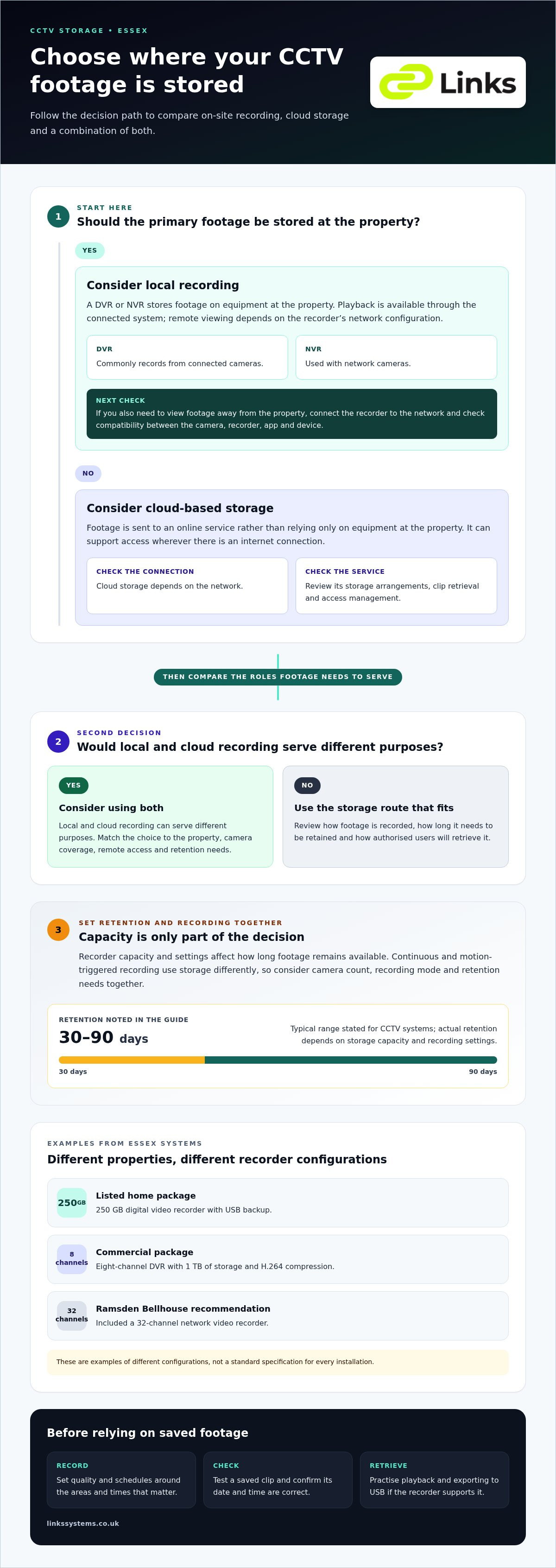
A DVR or NVR records camera footage onto storage at the property. A DVR commonly records from connected cameras, while an NVR is used with network cameras. The recorder’s capacity and settings affect how long footage remains available. For CCTV systems, retention typically ranges from 30 to 90 days, depending on storage capacity and recording settings.
Essex examples show how storage is matched to a system. One listed home package includes a 250 GB digital video recorder with USB backup. A commercial package uses an eight-channel DVR with 1 TB of storage and H.264 compression. A Ramsden Bellhouse recommendation included a 32-channel network video recorder. These examples illustrate different configurations, not a standard specification for every installation.
Local recording stores the primary footage on the recorder, so playback is available through the connected system. Remote viewing can make footage accessible away from the property, depending on the recorder’s network configuration. Set the recording schedule around the areas and times that matter. Continuous and motion-triggered recording use storage differently, so review both settings when deciding how long to retain footage.
Cloud-based storage sends footage to an online service rather than relying only on equipment at the property. It can support access wherever there is an internet connection, but depends on the network and the chosen service’s storage arrangements. Consider which cameras need cloud recording, how to retrieve clips and how access is managed. Local and cloud recording can serve different purposes.
During installation, configure recording quality, schedules and playback access together. Test a saved clip, check its date and time, and practise exporting it to USB if the recorder supports that function. This helps confirm that footage will be usable when needed. Businesses planning CCTV should match storage capacity to camera count, recording mode and retention needs, rather than choosing it by sector alone.
For a tailored CCTV system, consider storage alongside camera coverage and remote access. Taking these requirements together helps determine whether local recording, cloud storage or a combination suits the property.
Remote monitoring and alert response
Remote monitoring means viewing CCTV feeds from a separate location rather than only at the property. A Billericay residential system can be viewed and managed through a smart device or internal monitor. Authorised users can choose remote viewing or on-site checks, depending on the task and available connection.
Alerts add another layer. Configure motion detection for relevant areas, such as an entrance or vehicle access point, and choose which users receive notifications. Clear detection zones help focus alerts on useful activity. Review the camera view and detection settings together to reduce distractions from movement outside the intended area.
An alert is a notification, not a response plan. Decide who reviews alerts, how they access the relevant camera and what action follows. For a business, a named duty manager could check the live feed and review recorded footage if needed. Keep permissions up to date when staff responsibilities change.
Some systems provide 24/7 surveillance, while monitoring arrangements differ. A Chelmsford commercial CCTV system was monitored by a central station 24 hours a day. This is distinct from staff viewing footage on a smartphone: central station monitoring involves an external monitoring arrangement, whereas remote access lets authorised users view the system themselves.
For operational use, test an alert from each important camera and confirm it reaches the intended device. Check that the notification identifies the right camera, then open its live view and review the recorded event. Repeat the test after changing motion settings or user access. This helps establish whether detection, notifications and viewing work together efficiently.
Before enabling alerts, set out the purpose of monitoring and restrict footage access to authorised people. If cameras capture public areas or a neighbour’s property, the Data Protection Act 2018 applies to the footage, according to the UK legislation portal. Clear procedures help staff respond consistently and handle recorded material responsibly.
CCTV system configuration and setup
Configuration should connect camera placement, recording and network access to the premises’ needs. For residential or commercial use, plan coverage, remote viewing and access permissions together.
Wired and wireless system choices
Wired CCTV cameras connect to recording equipment through cables, while wireless models use a network connection to communicate. Both can support remote access when the recorder and network are configured for it. The choice depends on the building layout, cable routes, network coverage and where each camera needs to sit. A Benfleet IP CCTV system used a 4-channel recorder, showing how recorder capacity forms part of the design.
During CCTV installation, map each camera’s view against entrances, access routes and surrounding areas. At a residential property, avoid capturing more of a neighbour’s space than necessary. Before installation, confirm that the recording equipment supports the intended cameras and remote viewing method.
Broadband upload speed needs
Upload speed affects how smoothly footage travels from the premises to a remote device. No single figure suits every setup: demand varies with the number of cameras viewed at once, image quality and whether footage is streamed or uploaded. One live view places different demands on the connection from several simultaneous feeds.
Test remote viewing at the times the system will be used. If images pause or take time to load, compare performance on the local network with an external connection. Reviewing camera resolution, simultaneous users and network traffic can help identify where capacity is being used.
Securing remote access
Reduce unauthorised access by giving each user an individual account and removing access when their role ends. Use strong, unique passwords for the recorder and viewing accounts, and keep account details private. Limit permissions to the footage and functions each person needs.
During setup, change default login details and review which devices have access. Test approved logins from a smartphone and computer, then review accounts when staff or responsibilities change. These steps support controlled remote viewing, but do not replace careful handling of recorded footage.
For a professionally configured IP HD CCTV system, discuss your CCTV installation requirements and how remote access should work across your premises.
Links Integrated Systems: Speed Gates & Barriers
Links Integrated Systems designs and installs IP HD CCTV systems for organisations, with remote viewing planned around the premises and how staff need to access footage. Involve the team when planning a new system, coordinating existing cameras or integrating CCTV into a wider site security design.
At a site with controlled entrances, CCTV can work alongside Access Control Systems, IP Video Intercom Systems and Speed Gates & Barriers. Considering these systems together helps align camera coverage with entry points and everyday access arrangements. The design depends on the property, coverage requirements and how authorised users need to access the system.
Contact Links Integrated Systems to discuss your CCTV system and remote viewing requirements.
Plan the next step for your Essex property
A CCTV system remote access setup for an Essex property should reflect how people will use it, not just which devices can connect. Before agreeing the configuration, identify who needs access, which areas they need to view and what decisions the footage should support. This gives the system a clear operational purpose and aligns remote access with wider security arrangements.
Plan for changes to the premises, too. Staff responsibilities may shift, devices may be replaced and camera coverage may need adjustment. Reviewing permissions and system configuration helps keep the setup aligned with current site requirements. For organisations coordinating CCTV with entry management, Links Integrated Systems can discuss the wider security design.
Share your property requirements and intended use with the team to begin a focused conversation about a suitable setup. Contact Links Integrated Systems to discuss the next steps and move towards a configuration that fits your site.
Frequently Asked Questions
Can I access my CCTV system remotely?
Yes, you can view CCTV remotely when the cameras and recorder support network access and the property has an internet connection. For example, a site manager travelling between premises can check a live entrance feed from an authorised device. Remote access relies on compatible equipment, correct network configuration and account permissions. It provides access to footage, but does not determine how staff should respond to an event.
How do I set up remote access for a CCTV system in Essex?
For a CCTV system remote access setup in Essex, identify the recorder model, camera connections and internet service at the property. Confirm the equipment’s remote viewing method, then create individual user accounts with suitable permissions. Test access outside the property’s network and check that camera names and time settings display correctly. Keep a record of authorised users and update it when responsibilities change.
How do I configure CCTV remote access using an app, DDNS or VPN?
A CCTV system remote access setup in Essex can use an app, DDNS or VPN, depending on recorder and network compatibility. Set up the manufacturer’s app according to its instructions and account controls. DDNS can provide a consistent hostname when the internet connection’s public address changes, but does not replace access security. A VPN provides a route into the property’s network and requires compatible network equipment. Test the chosen method externally.
Which CCTV cameras and recorders support secure remote viewing in the UK
Choose cameras designed for network access and pair them with a compatible recorder and viewing method. Check compatibility between the camera, recorder, app and operating system, and give each authorised user appropriate access.
CCTV installation companies offering remote access in Essex
CCTV installation companies in Essex can configure compatible systems for remote viewing, including the recorder, network connection and user devices. Ask for a handover demonstrating smartphone viewing, playback and account management.