

What if your security infrastructure could do more than just lock doors and record footage? For many facility managers, the daily reality involves toggling between disconnected software for CCTV and door entry, a process that is both inefficient and prone to error. You likely recognise that managing separate platforms is no longer sustainable for a modern commercial site. This professional guide will show you how Paxton 10 access control solves this by unifying video management and site security into a single, web-based interface.
Whilst legacy systems often lack support for mobile credentials, this platform is built for the future, allowing you to utilise smart devices and Bluetooth keys with ease. We’ll explore how this technology streamlines operations and why professional commissioning is essential to ensure zero downtime during your transition. From the latest software updates to the critical 2026 changes in Net2 controller support, you’ll discover why moving to a unified platform is the most reliable way to future-proof your building’s security and maintain complete site intelligence.
Key Takeaways
- Learn how Paxton 10 access control integrates video management and entry systems into a single web-based interface for streamlined site oversight.
- Understand the benefits of modern smart credentials, allowing you to utilise smartphones and wearables as secure digital keys across your premises.
- Compare legacy Net2 systems with the unified Paxton 10 architecture to identify the most effective upgrade path for your commercial facility.
- Discover why professional commissioning is essential for ensuring network stability and seamless integration with high-end hardware like speed gates.
- Gain a clear understanding of the planning and audit requirements needed to implement a future-proof, IP-based security solution with zero downtime.
What is Paxton 10? Defining the Unified Security Platform
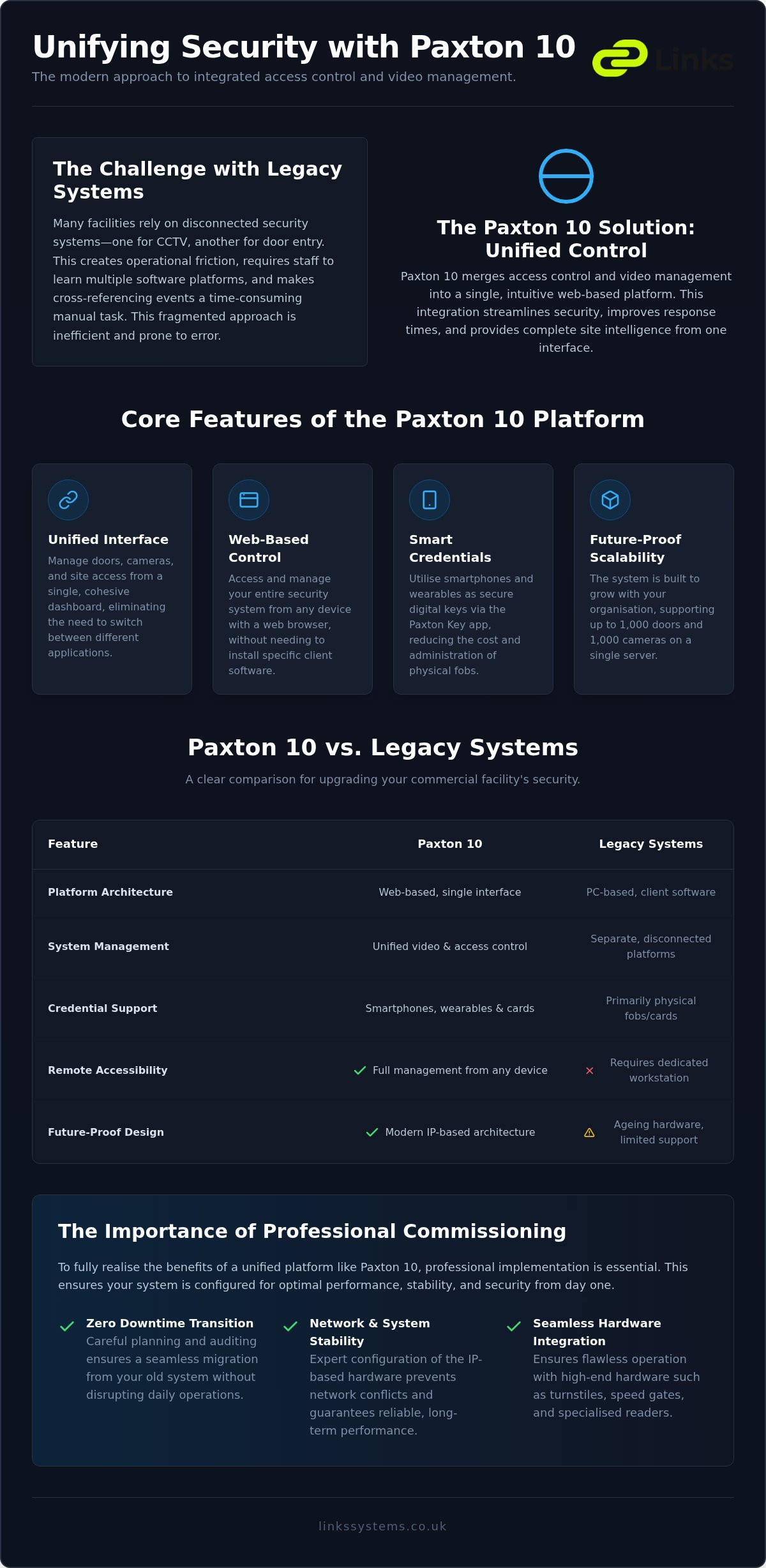
In the evolving field of building management, the traditional approach to security often relied on fragmented systems. You might have one software for cameras and another for door entry. Paxton 10 access control represents a departure from this inefficient model. It’s a web-based, unified platform designed specifically to bring access control and video management together under a single, intuitive interface. This convergence allows for a more cohesive security posture, where visual data and entry logs are no longer isolated data sets.
To understand the foundation of these systems, it’s helpful to look at the basic principles of What is Access Control? and how it regulates movement within a facility. Paxton 10 takes these fundamentals and modernises them for the digital age. The system relies on three core hardware components: the dedicated Paxton 10 server, high-performance controllers, and smart readers. This hardware works in tandem with web-based software that’s accessible from any device with a browser, making it a favourite choice for complex commercial developments throughout London and Kent.
The Core Philosophy of Unified Management
The true strength of this platform lies in how video management and access control interact amongst each other in real-time. When a user presents a credential at a door, the system can instantly trigger a recording or display a live feed from the nearest camera. This eliminates the need for security teams to cross-reference timestamps between two different software packages. Unified security is the convergence of physical access and visual verification into a singular operational workflow. By removing the need for multiple software licenses and reducing the training burden on staff, organisations can achieve a higher level of oversight with less administrative friction.
Scalability for Commercial Environments
Whether you’re managing a single-door boutique office or a multi-site corporate organisation, the architecture remains consistent. The Paxton 10 server acts as the central intelligence hub, managing system-wide data and ensuring that security protocols are applied uniformly across every entrance. It is built to handle up to 1,000 doors and 1,000 cameras on a single system, providing a robust path for growth. For those looking to understand how these systems fit into a broader strategy, our guide on Physical Security Integration for Commercial Buildings provides deeper context on modern infrastructure requirements. This scalability ensures that your investment remains relevant as your business footprint expands, providing long-term stability for your site security.
Key Features and Technical Architecture of Paxton 10
The architecture of Paxton 10 access control is defined by its decentralised, web-first approach. Unlike older systems that required a dedicated server PC running heavy software, this platform operates entirely through a web browser. This shift allows for unprecedented flexibility, as administrators can manage security protocols from any laptop, tablet, or smartphone without the need for local client installations. This accessibility is a core part of The Business Value of Unified Security, as it significantly reduces the IT overhead and maintenance associated with specific security workstations.
Web-Based Control and Mobile Accessibility
Facilities managers often find themselves away from their desks when an operational issue arises. With the secure portal, you can adjust visitor permissions or revoke access whilst off-site, ensuring the building remains secure at all times. The system provides real-time event logging and reporting, giving you an immediate audit trail of every entry and exit across the premises. This mobile-first strategy extends to the users themselves. By utilising the Paxton Key v2 app, staff can use smartphones and wearables as digital keys, which removes the costs and administrative burden of issuing physical fobs or cards.
The Hardware: Readers, Controllers, and Cameras
The hardware components are engineered for resilience and versatility in demanding commercial environments. Paxton 10 readers utilise multi-format technology, supporting both traditional RFID tokens and Bluetooth credentials simultaneously. This is particularly useful for phased rollouts where some staff prefer physical cards whilst others opt for mobile keys. The controller architecture employs distributed intelligence; each controller stores its own database, ensuring the door remains operational even if the network connection to the server is lost. Power over Ethernet (PoE) technology simplifies these modern security installations by delivering both data and power through a single network cable.
Video integration is another standout feature that differentiates this platform from siloed systems. It supports high-definition Paxton 10 cameras alongside third-party IP CCTV through standard protocols. This allows you to set automated site behaviour, such as triggering a site-wide lockdown or activating external lighting when an alarm is triggered. To ensure these complex features are configured correctly for your specific site, you might consider professional system commissioning to guarantee long-term stability and performance.
Paxton 10 vs Paxton Net2: Is it Time to Upgrade?
For many facility managers across Surrey and Hertfordshire, the choice between Net2 and Paxton 10 is a pivotal decision for their 2026 security strategy. Net2 has been the industry standard for decades, but its architecture relies on local PC software and third-party plugins for video. In contrast, Paxton 10 access control is built on a modern web-first framework where video management is a native feature rather than an add-on. This shift represents a fundamental change in how site data is processed and accessed.
The transition involves more than just a software update. Whilst Net2 uses traditional proximity cards, Paxton 10 supports Bluetooth ‘Smart Keys’ at no extra cost, allowing for a completely mobile-centric user experience. For businesses managing high staff turnover, the ability to issue and revoke digital credentials instantly via a browser is a significant operational advantage. The cost-benefit analysis often favours the newer system when considering the reduced IT maintenance and the long-term removal of multiple software licenses.
When to Stick with Net2
There are specific scenarios where maintaining a Net2 system remains the practical choice. If your facility already has an extensive network of Net2 Plus controllers and your current requirements don’t demand unified video, a full migration might be impractical at this stage. However, with the launch of Net2 version 7 in January 2026, it’s vital to recognise that Net2 Classic controllers are no longer supported. If your hardware is reaching its end-of-life, or if you are already planning to integrate your access points with professional speed gates and barriers, it may be the ideal time to evaluate a hardware refresh to the newer platform.
The Case for Paxton 10 Migration
For new build developments or major office refits, the case for a unified platform is clear. The long-term value lies in the reduction of hardware complexity and the elimination of siloed systems. By consolidating access and video, you create a more resilient security environment that is easier to monitor and maintain. This unified approach provides a single source of truth for all site events, which is particularly beneficial for organisations that must maintain strict compliance and audit trails. Moving to a web-based system ensures your technology is future-proof, supporting the latest smart devices and security protocols without the need for constant manual software patches on local workstations.
Planning and Implementing Your Access Control Solution
A successful deployment of Paxton 10 access control begins with a rigorous site-wide security audit. This process identifies every vulnerable entry and exit point, from main reception areas to loading bays and fire exits. We evaluate the flow of people and vehicles to determine where high-security hardware is required. Since the system is entirely IP-based, your network infrastructure must be engineered to support constant data traffic between controllers and the server. This involves a structured cabling plan that accounts for both current bandwidth and future expansion across multi-site organisations, ensuring the system remains responsive as you grow.
Compliance with UK building regulations and Secured by Design standards is a core requirement for any commercial project. This includes ensuring that fire exit protocols are properly integrated so that doors release automatically during an emergency. We also consider Part M of the Building Regulations to ensure accessibility is maintained for all users, including those with limited mobility. Proper planning at this stage prevents costly retrospective adjustments and ensures the system meets both safety and security obligations. Successful sites don’t overlook these foundational details during the design phase.
Integration with Physical Security Hardware
In high-traffic London office lobbies, the integration of Paxton 10 access control with commercial speed gates is a standard requirement for managing pedestrian flow. These barriers provide a physical deterrent that works in tandem with digital credentials to prevent tailgating and unauthorised entry. For larger sites, we synchronise perimeter barriers and bollards to ensure vehicle access is as tightly controlled as the main building entrance. This holistic approach is detailed in our guide on Integrating CCTV with Access Control Systems, which explains how visual verification enhances physical barriers.
Maintenance and Long-Term Reliability
Long-term reliability depends on a proactive maintenance schedule that includes regular system health checks and database optimisations. Firmware updates are essential to protect the system against evolving security threats and to ensure compatibility with the latest mobile devices and smart keys. Whilst basic installation might get the doors moving, professional commissioning is what prevents common fail-points like data lag or intermittent network drops. Regular maintenance is a necessity to maintain insurance compliance and ensure your policy remains valid. For a site that requires precision and stability, our team provides professional design and installation services tailored to your specific commercial infrastructure.
Why Professional Commissioning is Essential for Paxton 10
Many providers focus on how quick it is to fit hardware. However, a commercial-grade Paxton 10 access control system requires more than simple installation. Professional commissioning is the process of fine-tuning the technical architecture to ensure long-term stability. This involves configuring the network to prevent data collisions and ensuring the web-based server remains secure against unauthorised external access. Without this expert oversight, complex IP systems can suffer from intermittent latency or synchronisation errors between the cameras and the readers.
One of the most powerful features of the platform is the ability to create custom site ‘behaviours’. These are logical rules that dictate how the building responds to specific events. A professional commission of Paxton 10 access control ensures that when a fire alarm is triggered, the system doesn’t just release the doors but also directs specific CCTV cameras to the exit points. We work with you to map these operational requirements precisely, turning a collection of hardware into an intelligent site management tool that enhances safety and efficiency.
Expert Design and Supply in the South East
High-rise office environments in London present unique challenges for data infrastructure. We specialise in tailoring Paxton 10 for these complex vertical landscapes, ensuring that signal strength remains consistent across every floor. With 40 years of experience, we provide local support and maintenance contracts throughout Kent and Essex. For those considering remote management, our Cloud Access Control for Business Guide offers further insight into how web-based platforms enhance operational flexibility across multiple sites.
Beyond the Hardware: A Partnership Approach
Choosing a security partner is about more than the initial handover. We prioritise a partnership approach that includes comprehensive training for your facilities team. This ensures they can manage permissions and view footage without needing constant external support. Our maintenance schedules are designed to prioritise system uptime, preventing issues before they affect your daily operations. With four decades of industry presence, Links Integrated Systems acts as a steady hand for your security requirements.
Contact Links Integrated Systems for a professional Paxton 10 consultation to discuss your site requirements.
Future-Proofing Your Commercial Security Infrastructure
Adopting a unified platform is a strategic shift towards more intelligent site management. By bringing video and entry protocols together, you remove the operational friction caused by disconnected systems and outdated hardware. Paxton 10 access control provides the flexibility required for modern commercial environments, supporting everything from high-end speed gates to Bluetooth credentials on smart devices. This ensures your premises remain secure whilst offering a seamless experience for staff and visitors alike.
Success depends on more than just the software; it requires a foundation of expert design and meticulous technical configuration. With 40 years of professional security expertise, Links Integrated Systems specialise in delivering robust solutions for commercial sites across London and the Home Counties. We provide fully commissioned systems with ongoing maintenance support to guarantee long-term reliability and peace of mind. It’s time to move beyond fragmented security and embrace a truly integrated approach. Secure your premises with a professional Paxton 10 installation from Links Integrated Systems today.
Frequently Asked Questions
Can I use my existing CCTV cameras with Paxton 10?
Yes, you can integrate existing IP CCTV cameras with your Paxton 10 access control system, provided they are ONVIF compliant. This allows you to utilise your current hardware alongside new Paxton 10 cameras within a single interface. During the professional commissioning phase, we verify that your network and existing cameras are configured to communicate effectively with the server, ensuring visual verification is available across all entry points of your commercial site.
Is Paxton 10 a cloud-based or on-site access control system?
Paxton 10 is a web-based system that operates via a dedicated on-site server. This architecture provides the stability of local data storage whilst allowing for remote management through a secure web portal or mobile app. You don’t need to install software on individual workstations; instead, authorised users can manage the site from any device with a browser. This combines the reliability of on-premise hardware with the flexibility of cloud-style access for facilities managers.
Does Paxton 10 support mobile phone entry for staff?
Yes, the system fully supports mobile entry through the Paxton Key v2 app. Staff and contractors can use their smartphones or wearables as digital credentials, utilising Bluetooth technology to unlock doors. This eliminates the need for physical fobs and simplifies the administration of permissions for facilities managers in London and the Home Counties. These smart keys are provided at no extra cost, making it a cost-effective solution for modern, mobile-centric office environments.
What happens to the access control if the internet connection fails?
If your internet connection fails, the system will continue to function normally. Each Paxton 10 controller possesses distributed intelligence, meaning it stores its own database of access permissions locally. Whilst you may lose remote web access and live video feeds until the connection is restored, staff will still be able to enter and exit authorised areas. Once the network is back online, the system automatically synchronises all event logs with the central server without data loss.
How many doors and cameras can a single Paxton 10 system manage?
A single Paxton 10 system is highly scalable, supporting up to 1,000 doors and 1,000 cameras. This capacity makes it suitable for large-scale commercial developments and multi-site organisations throughout Kent and Surrey. The server manages all system-wide data, ensuring that even as you expand your infrastructure, the management interface remains unified and responsive. This level of scalability provides a future-proof foundation for growing businesses that require a high degree of site intelligence and oversight.
Is it possible to upgrade my Paxton Net2 system to Paxton 10?
Yes, you can transition from Net2 to Paxton 10 access control, though it requires a hardware upgrade. Whilst existing readers and tokens are often compatible, the Net2 controllers must be replaced with Paxton 10 controllers to support the unified web-based platform. We recommend a phased approach for large sites in Essex and Hertfordshire, starting with a security audit to determine the most efficient migration path for your specific infrastructure, cabling, and long-term security goals.
What are the licensing costs associated with Paxton 10 software?
One of the primary advantages of this platform is that it does not carry ongoing software licensing costs. Once the server and hardware are installed and commissioned, you have full access to the web-based software and mobile app features without monthly subscriptions. This transparent model allows commercial organisations to accurately budget for their security infrastructure. Your investment covers the hardware and professional commissioning, providing long-term value without the burden of recurring software fees for the life of the system.
Is Paxton 10 compliant with UK GDPR and data protection laws?
Yes, the system includes built-in features to help your organisation remain compliant with UK GDPR and data protection laws. Facilities managers can easily manage data retention periods for video footage and access logs, ensuring that personal information is not stored longer than necessary. The software also provides tools for generating audit reports and managing user consent, which are essential for maintaining regulatory standards in professional environments across London and the South East.