
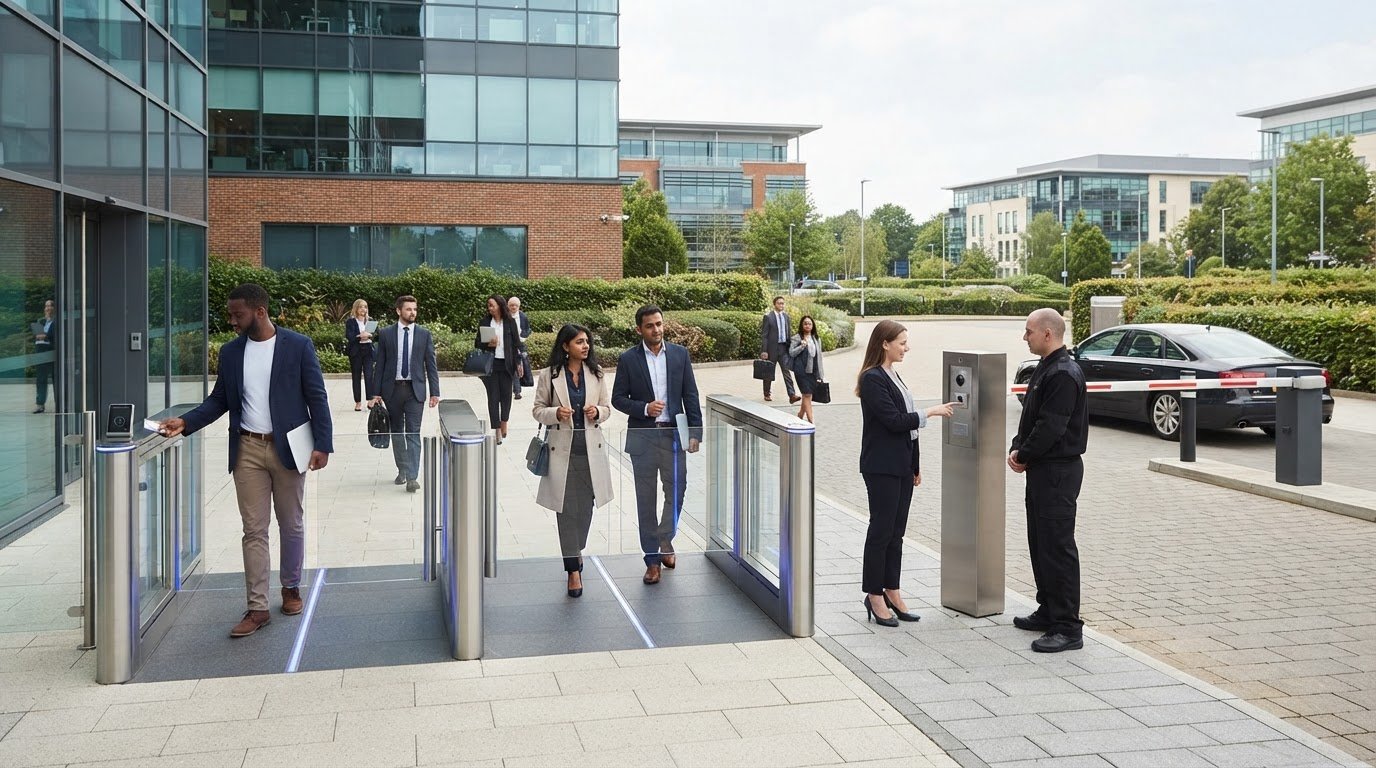
Access should follow a person’s role, not simply whether they hold a credential. Managing visitor access control in Essex means setting permissions for staff, visitors and contractors so each person can enter only the areas needed for their visit or work. Role-based access rights define those differences, while visitor procedures record who is on site and why.
A good process protects restricted areas without creating unnecessary barriers for legitimate visitors. Define access levels around people’s responsibilities, visit purpose, site layout and operating hours, then apply those rules consistently at every entrance.
This guide explains how to set staff and visitor permissions, manage check-in and temporary access, and plan a connected system across multiple doors or sites. It also covers cost factors, upgrades and when integrated access control, intercoms, gates or barriers may help. Use it to plan access that suits your premises and day-to-day operations.
Key Takeaways
- Set permissions by role and site so staff, contractors and visitors can access only the areas needed for their purpose.
- Plan connected entry points around shared permissions and central management, particularly when a site has multiple buildings or locations.
- Choose visitor procedures that cover advance approval, check-in, identification, badges and temporary access.
- Plan upgrades around existing equipment, the number and type of entry points, and the systems that need to work together.
- Match gates, turnstiles and vehicle barriers to how people and vehicles move through the site, rather than treating every entrance the same.
Networked access control for multiple entry points
A networked system applies permissions across connected entrances, rather than treating every door as a separate decision. For an Essex site, start by mapping the buildings, restricted areas and entry routes, then assign access rights to each user group.
Managing Building and Restricted-Area Entry
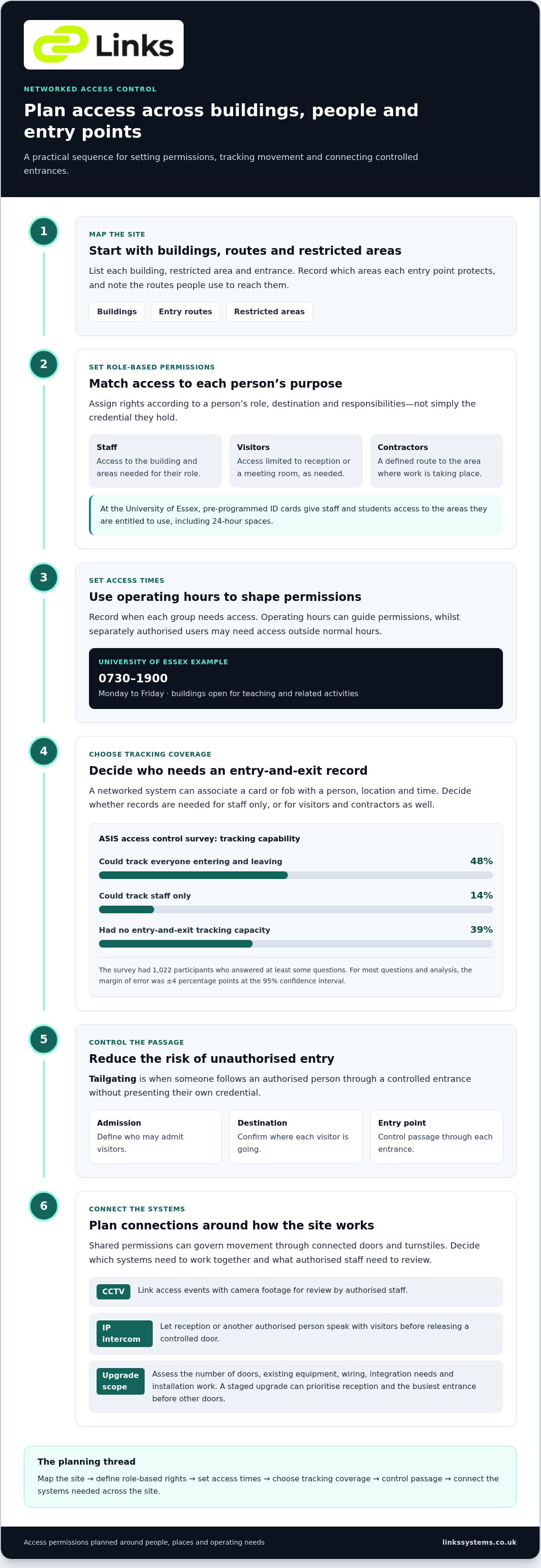
Set permissions around a person’s role and destination. Staff may need access to their building, whilst visitors may only need reception or a meeting room; contractors may need a defined route to a work area. At the University of Essex, pre-programmed ID cards give staff and students access to entitled areas and 24-hour spaces. This illustrates how one credential can apply different permissions.
Next, list each entrance and the areas it protects. Record which groups need access, when they need it and whether entry requires a staff member to admit them. The University of Essex’s buildings are open for teaching and related activities from 0730 to 1900 hours Monday to Friday. Operating hours can therefore inform permissions, while separately authorised users may need access outside normal hours.
Tracking Entry and Exit
Tracking depends on recording each credential’s use at an entry or exit point. A networked system can associate a card or fob with a person, location and time, helping authorised staff review movement through connected areas. Decide which entrances need records and whether to track visitors, contractors and staff, or only particular groups.
The ASIS access control survey found that 48% of respondents could track everyone entering and leaving their facilities. Another 14% could track staff only, whilst 39% had no entry-and-exit tracking capacity. These results show why the intended coverage matters: a record of staff access alone won’t provide the same picture as tracking all site users. The survey had 1,022 participants who answered at least some questions, with a ±4 percent margin of error at the 95 percent confidence interval for most questions and analysis.
Reducing Unauthorised Entry and Linking Systems
Tailgating occurs when someone follows an authorised person through a controlled entrance without presenting their own credential. Weak visitor controls can also make it difficult for staff to distinguish an approved guest from an unauthorised entrant. Reduce these risks by defining who may admit visitors, confirming their destination and controlling passage through each entry point.
Access control can coordinate with doors and turnstiles, so permissions govern movement through each connected point. It can also link with CCTV, allowing authorised staff to compare access events with camera footage. IP video intercoms let reception or another authorised person speak with visitors before releasing a controlled door. Plan connections around the entrances, sightlines and review processes your site needs.
Visitor management system costs and upgrade plans
For Essex businesses, system cost depends on the site, entry points and required functions. The price depends on the case and is given after a quote request; key factors include the number of doors, existing equipment, wiring, integration needs and installation work.
Assess the site and system scope
Start by listing entrances, user groups and visitor processes. A single-door office with reception needs a different arrangement from a site with several buildings, staff entrances and contractor routes. Record existing readers, door controls and network infrastructure to identify what can remain and what needs replacement or connection.
Include the visitor process in the project scope, not just the door hardware. Decide whether reception will record names, issue badges and notify a host, or whether visitors will request entry through an audio or video intercom. Each function affects system design and installation requirements.
Plan upgrades in practical stages
Among organisations using manual visitor systems or no system, 41% said adding a visitor management system was part of an upgrade plan. Use that step to identify the main weakness first: paper records, inconsistent visitor credentials or disconnected entry points. Then map the change against existing access control systems and the site’s operating needs.
A staged upgrade can prioritise reception and the busiest entrance before extending to other doors. Suitable existing equipment may be retained while a new visitor process is connected, then other entry points can be assessed for integration. This makes the scope and dependencies clear before work begins.
Consider standalone door entry
Standalone access control can manage a single door or entry point using audio or video door entry, key code entry or T-card systems. It may suit a small premises where one entrance needs controlled release and wider network management is unnecessary. Compare this simpler scope with the need to share permissions or records across multiple doors.
Include maintenance and warranty terms
Plan maintenance around the installed equipment, access points and operational demands. A maintenance schedule can set out inspections, functional testing, fault reporting and commissioning responsibilities. For example, check that the reader, controlled door and release process work together after installation or a system change.
Review warranty terms alongside the equipment and installation scope. Establish which components and work are covered, the coverage period, exclusions and the process for reporting a fault. This helps distinguish warranty cover from planned maintenance and informs decisions about future upgrades.
Access rights for staff and visitors
Role-based access control assigns permissions according to each person’s role. Start by listing user groups, such as permanent staff, temporary staff, contractors, students and visitors. For each group, define the buildings and rooms they need, appropriate access times and any areas that remain restricted. For example, a receptionist may need access to the entrance and meeting rooms, but not a secure records area.
Tie permissions to work and visit requirements. A contractor scheduled to service equipment can receive access to the relevant work area, while a meeting guest may need access only to reception and the host’s room. Review access groups when duties change. This makes it easier to adjust permissions without granting wider access than the person’s role requires.
Credential management is essential, too. Access control fobs and swipe cards can be deleted from the system when an employee leaves or a credential is lost. Set a clear process for reporting lost credentials and removing access when someone’s employment or assignment ends. This avoids relying on the physical return of a card and keeps permissions aligned with current users.
The University of Essex provides a practical example of time-sensitive access. Specified buildings are locked by security staff from 1830 to 0700 hours, while authorised staff and students can still enter using keypad or SALTO access. University staff are required to carry their ID cards while on University property. These arrangements show how a site can combine operating hours, authorisation and credential checks. In broader commercial settings, deploying professional guard teams—such as those provided by Northwest Security Services—helps organisations actively oversee building lockups, monitor visitor movement, and maintain physical security alongside electronic access measures.
Different groups may need different conditions outside normal hours. At the University of Essex, student out-of-hours access is for individual use and does not permit guests or student groups. When setting local permissions, define whether users may enter alone, bring a guest or access an area outside standard opening times. Record these distinctions in the access policy and configure permissions accordingly.
Explain the rules as part of staff induction. In the ASIS access control survey, 75% of participants said their organisation emphasised access control policies during employee orientation. A short procedure can tell staff how to display credentials, handle visitor entry and report a lost card. The ASIS survey also found that two-thirds of respondents said their organisations had to meet access control standards set by statute or regulation. Regular reviews help keep assigned permissions and documented procedures consistent with site requirements.
Turnstiles, gates and vehicle barriers
Choose entry equipment to suit the people, vehicles and routes using each entrance. First identify whether the priority is controlling pedestrian flow, separating authorised users or managing vehicle access.
Choose equipment for the entrance
Turnstiles suit pedestrian entrances where each person must present an individual credential before proceeding. A staff entrance beside a reception lobby, for example, may need a different arrangement from a public-facing visitor entrance. Speed gates can guide authorised pedestrians through a controlled route while keeping reception or other staff aware of access decisions.
Consider the surrounding layout as well as the equipment. A narrow corridor, nearby desk or busy shared entrance can affect queues and staff supervision of arrivals. Mark the proposed entry route on a site plan, including where visitors meet their host. This helps prevent a controlled passage from obstructing normal movement.
Plan vehicle access separately
Vehicle barriers control access to a car park, service yard or delivery entrance. Map the route from the site boundary to the destination, then identify where drivers should stop and request entry. A delivery gate, for example, may need a different admission process from a staff car park barrier.
Decide how drivers will be identified and admitted. Options include staff-controlled release or credentials assigned to authorised users. Consider visitors arriving by car, delivery drivers and regular contractors separately. Clear entrance instructions can direct each group to the right point without relying on drivers to find reception unaided.
Coordinate pedestrian and vehicle routes
Where pedestrians and vehicles share a boundary, plan their routes together. A staff car park barrier and pedestrian turnstile, for example, may need separate approaches, with visitor directions leading towards reception. This makes routes easier to understand and gives staff a clear point for handling arrivals.
Review entrance operation during busy periods, deliveries and scheduled events. A barrier may control vehicles, but it will not manage pedestrians using a nearby gate. List each entry type and its expected users, then assign a suitable admission method. Include a process for visitors who arrive without the expected credential.
Check the complete operating arrangement
Before installation, document the location of each gate, turnstile and barrier, the users assigned to it, and the visitor admission process. For example, note who handles a vehicle entry request and how pedestrians are directed from the boundary to reception. Check that the access rules work across the planned routes, rather than assessing each device in isolation.
Include ongoing operation in the plan. Identify who updates permissions, manages visitor arrivals and reports faults affecting an entrance. A site with separate staff, visitor and delivery routes can then keep each access process clear as needs change.
Visitor access control and visitor management
Visitor management records who arrives, why they’re visiting and how they’re admitted. The ASIS access control survey found that 41% of respondents had integrated visitor management with access control technology. A consistent approach to managing visitor access control Essex-wide can help workplaces align reception procedures with entry permissions.
Digital Records and Paper Sign-In
A paper book records arrivals manually, but its entries can be difficult to review consistently. A digital process can make visitor details easier to retrieve and connect check-in with access permissions. The ASIS access control survey found that 40% of organisations used manual visitor management exclusively, whilst a further 20% used manual processes at some sites and digital systems at others.
Choose based on how reception handles arrivals, visitor credentials and records. The same survey found 60% agreed or strongly agreed their access control system met requirements for managing visitors, contractors and temporary staff. That leaves a practical question for each workplace: does the current process cover every site and visitor group?
Handling Visitor Details and ID
UK workplaces should collect only the details needed to manage a visit, explain why they are collected, restrict access to records and set a retention period. Apply these data protection principles when collecting names, visit details or identification information. Avoid recording extra ID data without a clear operational reason.
The ASIS survey found that just over two-thirds of respondents required visitors to show valid identification, and just over two-thirds required visible visitor badges. Decide what reception needs to check and record, and who can see those records. Explain how visitor information will be used and protect paper and digital records from casual access.
Setting Up Workplace Access Control
At an Essex workplace, start by mapping visitor entrances, reception points, meeting areas and restricted rooms. Define who approves visits, what reception records and how visitors receive temporary access. Then test the process with a typical appointment, from arrival and host notification to badge issue and departure.
For University of Essex events attended by people from outside the University, departments must notify the Security Manager at least five days beforehand. For events outside normal hours, the University recommends seven days’ advance notice. These examples show why event approval and access arrangements should be set before visitors arrive. When managing high-profile gatherings or private functions that require dedicated physical security, specialists like Stone Security Services can coordinate hands-on attendee screening alongside facility access protocols.
Managing Contractors and Temporary Visitors
Give contractors and delivery drivers a process suited to their destination and task. Record their host or work area, issue only the required visitor credential and explain where to report on arrival. For example, direct a delivery driver to a goods entrance, while a contractor checks in with the staff member responsible for the work.
The ASIS access control survey found 37% of participants required all visitors to be known in advance and prescreened by security. Use advance approval where the site’s work or restricted areas call for it. Set an end point for temporary access, and ensure visitors return badges or credentials before leaving. Teams managing visitor access control Essex-wide can use these steps to shape a consistent site process.
For a site-specific visitor access plan, discuss your access control requirements.
Links Integrated Systems: Speed Gates & Barriers
Links Integrated Systems can help turn your site’s access requirements into a coordinated physical security arrangement. Involve the team when planning controlled pedestrian or vehicle entry, reviewing connected doors or aligning visitor access with reception procedures.
Its services include Speed Gates & Barriers and Access Control Systems, alongside IP Video Intercom Systems and IP HD CCTV Systems. These can address different parts of an entrance plan, from controlling passage to communicating with visitors and monitoring site areas. The right combination depends on your entrances, visitor routes, existing equipment and access policies.
For a project involving new entry points or an upgrade, set out your site layout, user groups and visitor process. Contact Links Integrated Systems to discuss your access control requirements.
Plan your next access control step
Effective visitor access starts with a clear operational brief. Identify where visitors arrive, who authorises entry and how access should change as site needs evolve. This gives your team a practical basis for managing visitor access control in Essex and planning a system that fits how your premises operate.
Links Integrated Systems can help turn those requirements into a coordinated solution. Its services include Speed Gates & Barriers, Access Control Systems and IP Video Intercom Systems. These technologies can support an entry plan shaped around your building layout, visitor routes and staff procedures.
Whether you’re planning a new installation or reviewing an existing arrangement, a focused discussion can clarify the next steps. Contact Links Integrated Systems to discuss your site requirements and move towards a more organised approach to entry.
Frequently Asked Questions
How do I set up different levels of clearance for different people in order to limit access?
Create access groups based on duties, then assign each group only the entrances and areas needed for its work. For example, give facilities staff access to plant rooms, while a meeting guest can be admitted to reception and a booked room. Set an approval process for exceptions, such as a visitor needing temporary access elsewhere, and review group membership when responsibilities change.
What visitor access control systems are available in Essex?
Options include electronic access control for doors, IP video intercoms for checking visitors before releasing an entrance, and speed gates or barriers for controlled pedestrian or vehicle routes. IP HD CCTV can support site monitoring. The right combination depends on your premises and how visitors arrive. A reception-led office, for example, may prioritise door entry, while a site with vehicle deliveries may need a managed barrier.
How much does visitor access control cost in Essex?
The price depends on the case and is given after a quote request. The main cost factors include the number and type of entry points, existing equipment, installation requirements and whether systems need to be connected. A single controlled entrance has a different scope from a multi-building site with staff, visitor and vehicle routes. Defining the intended coverage and visitor process helps establish a suitable project scope.
Which Essex companies supply and install visitor management systems?
Links Integrated Systems supplies and installs physical access solutions for commercial and professional premises in Essex, including Access Control Systems, IP Video Intercom Systems and Speed Gates & Barriers. These can help manage entry and visitor arrivals. The company also serves London, Kent, Surrey and Hertfordshire. For a workplace project, share your site layout, entry points and visitor needs with the team to discuss a physical security arrangement suited to your requirements.