
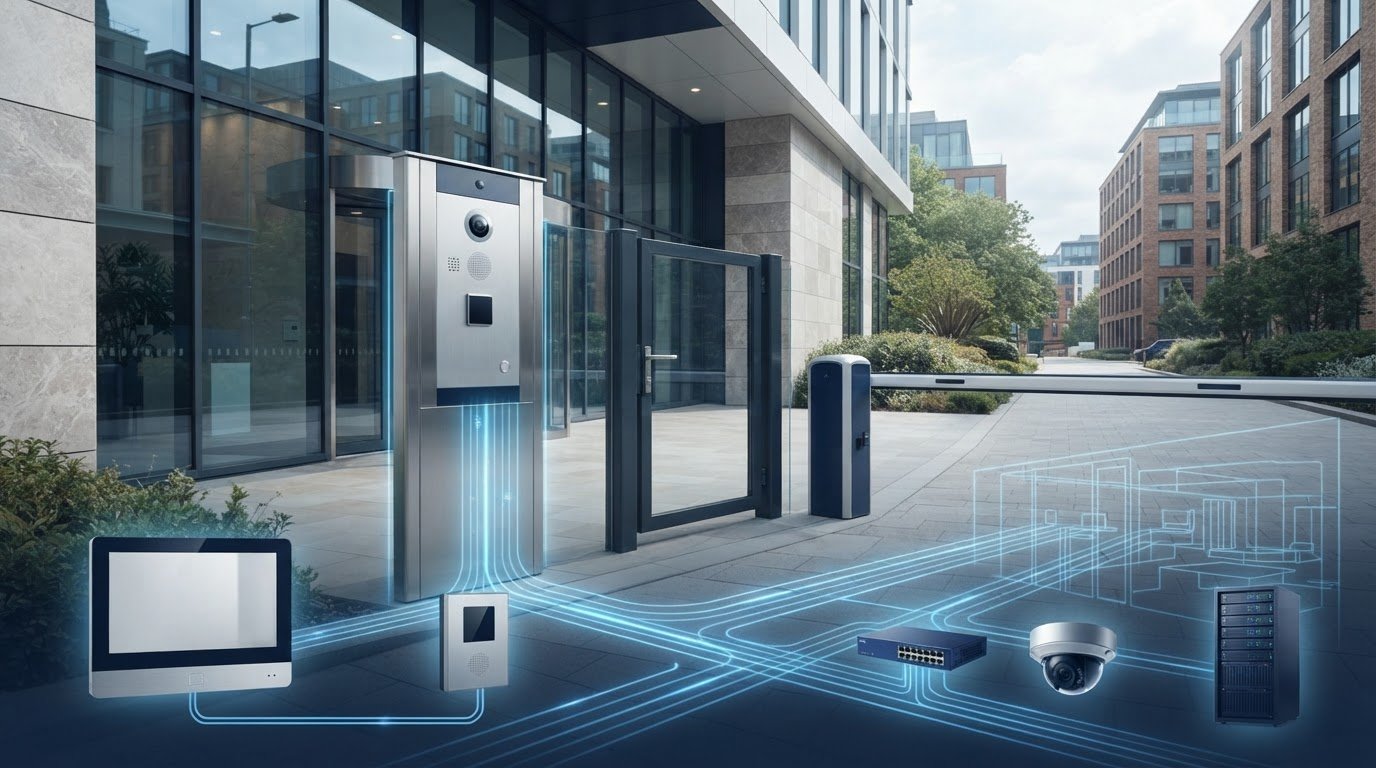
What makes a video entry system dependable is not just the equipment, but how well it is specified for the building and its network. The Comelit VIP Video Intercom provides an IP-based option for commercial sites. Before choosing it, consider data protection, compatibility with other devices and how it will work with existing access control or CCTV. A well-planned system should suit the site without adding unnecessary complexity.
There is more to assess than the entrance panel. Network design, device compatibility and commissioning all affect day-to-day performance and future expansion. This guide covers practical decisions when specifying Comelit ViP, including mobile access, integration and the trade-offs of a system built around compatible Comelit equipment.
We’ll look at the steps that support a reliable installation, from infrastructure planning to ongoing maintenance. Links Integrated Systems supplies, installs and commissions IP video intercoms, including systems coordinated with speed gates and barriers. The aim is a clear specification and dependable support throughout the system’s working life.
Key Takeaways
- Understand how the Comelit VIP Video Intercom uses IP infrastructure and what that means for network planning.
- Compare ViP with two-wire Simplebus against your site’s needs and existing cabling.
- Plan how the intercom will work with access control, CCTV and commercial speed gates or barriers.
- Review scalability and device compatibility before specifying the system, especially if future expansion is likely.
- Allow for commissioning, configuration and ongoing maintenance to support reliable operation.
What is the Comelit ViP System and Why Choose IP Video Entry?
Comelit ViP is an IP-based video entry protocol. Instead of connecting entrance panels and internal monitors through a traditional two-wire bus, it communicates over an Ethernet-based local area network (LAN). This can suit commercial buildings with structured network cabling and plans to coordinate access control, communications and future expansion. Specify the Comelit VIP Video Intercom around the building’s actual network capacity, layout and security requirements.
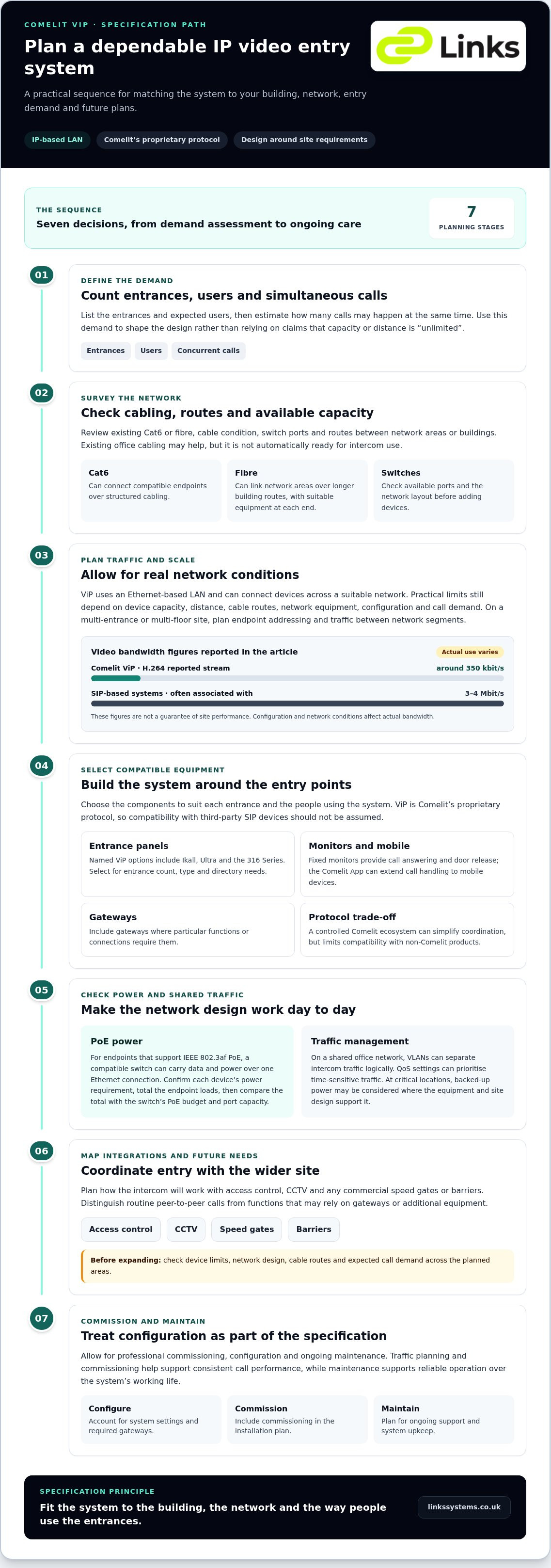
Simplebus uses a dedicated two-wire system, while ViP uses IP infrastructure. This can make it easier to connect devices across a larger or more complex site, but it does not make distance or capacity unlimited. Cabling, network design, device limits and configuration all set practical constraints. Start by listing entrances, users and expected concurrent calls, then make sure the system design can handle that demand without relying on broad “unlimited” claims.
The Core Technology: How ViP Differs from SIP
SIP is a widely used communications protocol, while ViP is Comelit’s proprietary protocol. Its closed design means interoperability centres on compatible Comelit equipment, rather than being assumed across third-party SIP devices. Comelit ViP has been reported to use H.264 video compression, with a stream around 350 kbit/s, compared with 3–4 Mbit/s often associated with SIP-based systems. Actual bandwidth depends on the configuration and network conditions. On a busy site, traffic planning and commissioning help support consistent call performance.
The system’s peer-to-peer architecture can allow devices to communicate without routing every call through a central server. Gateways may still be needed for particular functions or connections, so distinguish routine calls from services that rely on additional equipment. The protocol presents a trade-off: a controlled device ecosystem can simplify coordination, but limits compatibility with non-Comelit products.
Key Components of a ViP Installation
A typical installation brings together external entrance panels, internal monitors, network infrastructure and any required gateways. Panel options named for ViP installations include Ikall, Ultra and the 316 Series. Internal monitors provide fixed points for answering calls and releasing doors, while the Comelit App can extend call handling to mobile devices. Where compatible equipment and the network design allow it, PoE switches carry data and power over Ethernet, reducing the need for separate cabling.
- Entrance panels: Select panels for the number and type of entrances, as well as the requirements of the user directory.
- Monitors and mobile access: Choose suitable ways for occupants and staff to receive calls and manage entry.
- Gateways and switches: Include the equipment needed to connect system elements and support the network layout.
When assessing ongoing costs, separate core on-site intercom functions from optional cloud, mobile or support services. A locally managed system need not depend on a cloud subscription for every core function, but app and remote-access features may have separate terms. Identify these during specification rather than assuming every feature is included without a fee. Links Integrated Systems supplies, installs and commissions IP video intercoms, planning system components around the building and its access requirements.
Technical Architecture: Scalability and Network Requirements
For a commercial site, network planning matters as much as choosing the entrance equipment. Comelit ViP uses IP connectivity, allowing devices to communicate across a suitable local area network instead of being confined to a single two-wire run. Its peer-to-peer architecture can support communication between endpoints without a central server handling every routine call. Gateways or other equipment may still be needed for particular functions, so map the full system rather than treating “serverless” as a description of every feature.
IP architecture can support expansion, but it does not remove limits on device capacity or distance. Practical scale depends on the system design, network equipment, cable routes and call demand. A multi-entrance office, for example, needs a plan for endpoint addressing, traffic between network segments and expected simultaneous calls. Establish these requirements before extending the system across floors or buildings.
Existing Cat6 cabling or fibre may provide a useful foundation, depending on the requirements of each device and the network layout. Cat6 can connect compatible endpoints over structured cabling; fibre can link network areas over longer building routes, typically with suitable network equipment at each end. Survey the cable condition, available switch ports and routes between buildings. Do not assume existing infrastructure is ready simply because it already carries office data.
PoE and Power Management
Where an endpoint supports IEEE 802.3af Power over Ethernet (PoE), a compatible switch can carry power and data on the same Ethernet connection, reducing separate power runs. Confirm each device’s power requirement before choosing switches. Add the endpoint loads together, compare the total with the switch’s PoE budget, and account for port capacity and planned expansion. At critical locations, consider resilient power arrangements, such as backed-up supplies, where the equipment and site design support them.
Managing Bandwidth on Shared Networks
On a shared office network, VLANs can separate intercom traffic logically from general business data, while Quality of Service (QoS) settings can prioritise time-sensitive audio and video. These measures help manage traffic, but are not encryption or a complete security control on their own. Remote app access also depends on the configured network path and the services required by the selected functions. Define access permissions and data flows with internal administrators, or consult managed IT specialists like JP Technical to ensure the network infrastructure is properly configured for connected hardware.
Network planning should account for the wider security environment, not just intercom traffic. Integrated security systems bring together components such as entry, access control and video surveillance, so clear interfaces and responsibilities matter. Links Integrated Systems commissions and maintains IP video intercoms, considering network requirements alongside the site’s access arrangements. For a building-specific design, discuss your intercom and network requirements with the team.
Comelit ViP vs. Simplebus: Selecting the Right System for Your Site
Choosing between Comelit ViP and Simplebus depends on the building’s infrastructure, operating needs and likely future changes. ViP uses an IP network; Simplebus uses a dedicated two-wire connection and may be practical where existing wiring is suitable or new Ethernet cabling would be difficult to install. Neither option suits every site. Assess entrances, users, call patterns and integration requirements together.
When to Choose Simplebus
Simplebus may suit a smaller site with a straightforward entrance arrangement, modest expansion plans and serviceable two-wire cabling. Reusing suitable wiring can reduce the amount of new infrastructure required, which can be useful during a retrofit. However, topology and device capabilities affect system reach and call handling. Inspect and document older hybrid wiring, since its condition, connections and previous alterations can affect reliability and future maintenance.
Why ViP Can Suit Larger Commercial Sites
ViP is worth considering where a building already has suitable IP infrastructure, needs to connect multiple areas or is likely to expand. Network-based architecture can support more flexible layouts, but compatibility centres on Comelit equipment because ViP is a proprietary protocol. Treat integration with a third-party building management system as a specific design requirement, not something guaranteed by IP connectivity alone.
For a small office, consider whether an IP upgrade addresses a real operational need. If a simple entry arrangement works well and the existing two-wire cabling is sound, replacing it may add infrastructure without a clear benefit. By contrast, a multi-tenant building with numerous entrances may benefit from the flexibility and expansion options of a new IP system. Compare the full project scope, including cabling, equipment, configuration and ongoing maintenance, rather than comparing panel prices alone.
Retrofitting calls for a site survey. Record cable routes, assess their condition, identify available network connections and map where future entrances or management points may be needed. Existing fibre or Cat6 may support an IP design if the equipment and network layout are suitable. Where they are not, new cabling or additional network equipment may be required. Specify the Comelit VIP Video Intercom against actual site conditions, not the assumption that all existing cabling can be reused.
- Keep Simplebus in view for a contained project with suitable two-wire cabling and limited planned change.
- Assess ViP for a site seeking IP-based expansion, provided the network and compatible equipment meet its requirements.
- Plan integration explicitly by identifying the systems and functions that need to exchange information.
Future-proofing means planning for maintainability and change, not simply selecting the newer architecture. Confirm how additional entrances, users and compatible devices could be accommodated, and record the configuration for future support. ViP can provide a path for network-led expansion, while Simplebus may remain appropriate where existing infrastructure and site requirements favour it. Professional commissioning helps ensure the selected system works as designed and remains manageable throughout its lifecycle.
Integration: Linking Intercoms with Physical Security
A video intercom can form the first step in a wider security workflow. A visitor calls from the entrance, an operator verifies their identity, and access is granted through the appropriate door or barrier. For the Comelit VIP Video Intercom, define how each device and platform should respond to an event, then specify the interfaces and configuration needed to make the process dependable.
In a commercial building, the entrance panel and lobby equipment should support a clear visitor route. Linking video entry with commercial speed gates and barriers can let staff authorise a visitor at the external entrance and manage their passage through the lobby. The intercom, access control and barrier each have distinct roles. An intercom call alone should not be treated as proof that someone is authorised to pass.
Visitor Management and Speed Gate Integration
Map the visitor journey from arrival to reception or the host’s floor. Decide who answers calls, how identity is checked, which access point is released and what happens when a call goes unanswered. If temporary credentials such as QR codes form part of the wider access-control design, verify that the relevant reader and management platform support the intended workflow. Do not assume that a particular intercom panel scans codes or directly controls a gate without compatible equipment and interfaces.
Physical coordination matters too. Panel position, approach space, lane layout and visitor instructions affect how smoothly people move from the entrance to the lobby. A consistent finish between entrance equipment and speed gates can help create a coherent reception environment. Links Integrated Systems installs intercoms and speed gates or barriers, coordinating equipment around the site’s access requirements.
Unified Security Dashboards
Connecting intercom events with CCTV can help operators review relevant footage when a visitor calls or a door is released. For sites operating integrated visual surveillance, advice from Scaitec Security Solutions Ltd highlights how regular maintenance of connected cameras ensures footage remains sharp and reliable when called upon. Depending on the platforms and configuration, events may also be passed to an access-control interface or used to prompt a notification in an existing security system. Define the event, recipient and response for each scenario. Do not treat a possible integration as an automatic feature of every installation.
Wiegand and OSDP are examples of interfaces used in access-control environments, but their presence does not guarantee direct compatibility with every ViP device. The system design should identify which controller receives the credential or release signal, what information is exchanged, and whether an interface module is required. Establishing these points early helps avoid gaps between video verification and access permissions.
A logical operator view can reduce the need to move between disconnected systems. Integrating CCTV with access control systems can bring related events and video into a more useful operational picture. Where the platforms allow it, intercom health can also be monitored alongside other IP security devices. For a coordinated design linking video entry with barriers and CCTV, discuss your commercial intercom integration with Links Integrated Systems.
Professional Commissioning and Long-Term Maintenance
Installing the equipment is only the first stage. Professional commissioning configures the system for the building, verifies communication between devices and confirms that the agreed access workflows operate correctly. Without this work, a Comelit VIP Video Intercom may be in place but poorly matched to the site’s user directory, network plan or day-to-day procedures.
Commissioning covers software settings, IP addressing and device configuration. Each endpoint needs a clear place in the network plan, with addresses and records organised so future faults can be traced efficiently. Review and update firmware in line with the manufacturer’s guidance, taking account of compatibility and the effect an update may have on connected equipment. Document changes rather than applying them without a record.
The Commissioning Process
For a multi-tenant building, configure the directory, call destinations and access permissions around how occupants and staff use the site. Test calls across the installed endpoints, checking speech intelligibility, picture quality, door-release operation and any agreed integrations. Assess network performance under representative conditions, including concurrent calls where required. Complete the handover with clear operating instructions for building managers and security staff.
A structured handover should record system components, network details, user and access-level administration, and the process for recording faults or changes. This gives the facilities team a useful reference when occupants change or building procedures are revised. It also helps distinguish equipment faults from configuration or network issues.
Scheduled Maintenance for IP Intercoms
External panels are exposed to rain, dust, temperature changes and everyday contact. Maintenance should include cleaning with suitable methods, inspecting enclosures and weather seals, and checking that buttons, microphones, speakers and cameras are unobstructed and functional. Record damage or deterioration so it can be addressed before it affects normal use.
System health checks should review device status, call operation, network connections and configuration records. Where remote diagnostics are available and authorised, they can help identify symptoms such as intermittent connectivity. An on-site inspection may still be needed to find the cause. Review firmware and software in line with the manufacturer’s recommendations, planning updates so their impact on building operations is understood.
Maintenance is also an opportunity to review user access, data handling and site procedures against applicable security standards and data-protection requirements. Requirements can depend on how the system is configured and used, so keep records of decisions and changes. Links Integrated Systems commissions and maintains systems, supporting them through installation, operational checks and ongoing care. For a planned maintenance and commissioning approach suited to your site, discuss your IP intercom requirements with the team.
Set Your Site Up for Reliable Entry
Start by turning the building’s access requirements into a clear specification. Consider how visitors should move through the site, which teams need to manage calls and permissions, and how the Comelit VIP Video Intercom should fit the existing network and security systems. A site-specific plan can identify practical constraints early and give installation and commissioning a clear direction.
Links Integrated Systems supports commercial projects with integrated physical security systems, professional installation and ongoing maintenance across London, Kent, Surrey, Hertfordshire and Essex. The team can help shape a specification around your building and its operational needs.
Request a professional Comelit ViP specification for your site and take the next step towards a reliable, well-planned entry system.
Frequently Asked Questions
Does the Comelit ViP system require a monthly subscription fee?
Core operation on a locally managed system does not necessarily require a monthly subscription, but optional services may have separate terms. Mobile or remote-access functions, in particular, can depend on the services selected and how the system is configured. When finalising the specification, distinguish essential on-site functions from optional connected features, then identify any ongoing costs and account requirements for each.
Can I use existing Cat5e or Cat6 cabling for a Comelit ViP installation?
Potentially, if the cabling, network equipment and selected devices are suitable. A cable’s category alone does not show whether it will support the required connection, power or layout. For a refurbishment in London, Kent, Surrey, Hertfordshire or Essex, assess and document cable routes, condition, switch capacity and any links between buildings. This helps establish where existing infrastructure can be retained and where changes are needed.
How many internal monitors can be supported on a single ViP network?
There is no single monitor count that applies to every installation. The supported configuration depends on the ViP equipment, network design and other endpoints sharing the system. For a multi-tenant building, prepare a schedule showing the number and location of monitors, expected call routes and any concurrent-call requirements. The design can then be assessed against those needs instead of relying on an “unlimited” device claim.
Is it possible to answer Comelit ViP calls on a smartphone or tablet?
Yes. Mobile devices can receive ViP calls through the Comelit App when the relevant system functions are configured. This gives an authorised user a way to respond away from a fixed monitor. The experience depends on the device, app setup and network connection. Remote access may be interrupted by a loss of internet or service, even if local intercom functions remain available.
Can Comelit ViP integrate with my existing third-party access control system?
Integration may be possible when the access-control equipment and required interfaces are compatible. Because ViP uses a proprietary protocol, compatibility should not be assumed from network connectivity alone. Define the intended action, such as releasing a controlled entrance after an authorised call, and identify which system makes the access decision. Documenting the interface and event sequence helps avoid gaps between visitor verification and access permissions.
What is the maximum distance for a Comelit ViP intercom run?
There is no universal maximum distance for every ViP layout. The practical limit depends on cable type, network equipment, topology and the route between devices. Fibre links may be relevant between network areas, with appropriate equipment at each end, while endpoint connections have their own requirements. Record cable lengths and intermediate network points on the site plan so the proposed layout can be assessed accurately.
Does the system support high-definition (HD) video for better identification?
IP video capability alone does not confirm that every ViP panel and monitor provides HD resolution. Image detail depends on the selected equipment and system configuration. If operators need to identify visitors clearly, specify the required image performance for the entrance conditions, including lighting and viewing distance, and ensure the selected components meet that requirement. Test the image from the installed position during commissioning.
What happens to the intercom system if the building’s internet goes down?
A loss of internet access does not necessarily stop communication across a functioning local network. Local calls may continue, depending on the system configuration and the availability of network power and equipment. Functions that rely on external connectivity, such as receiving calls remotely on a smartphone, may be interrupted. For business continuity, document which functions are local and which depend on internet access, then test the expected behaviour.