
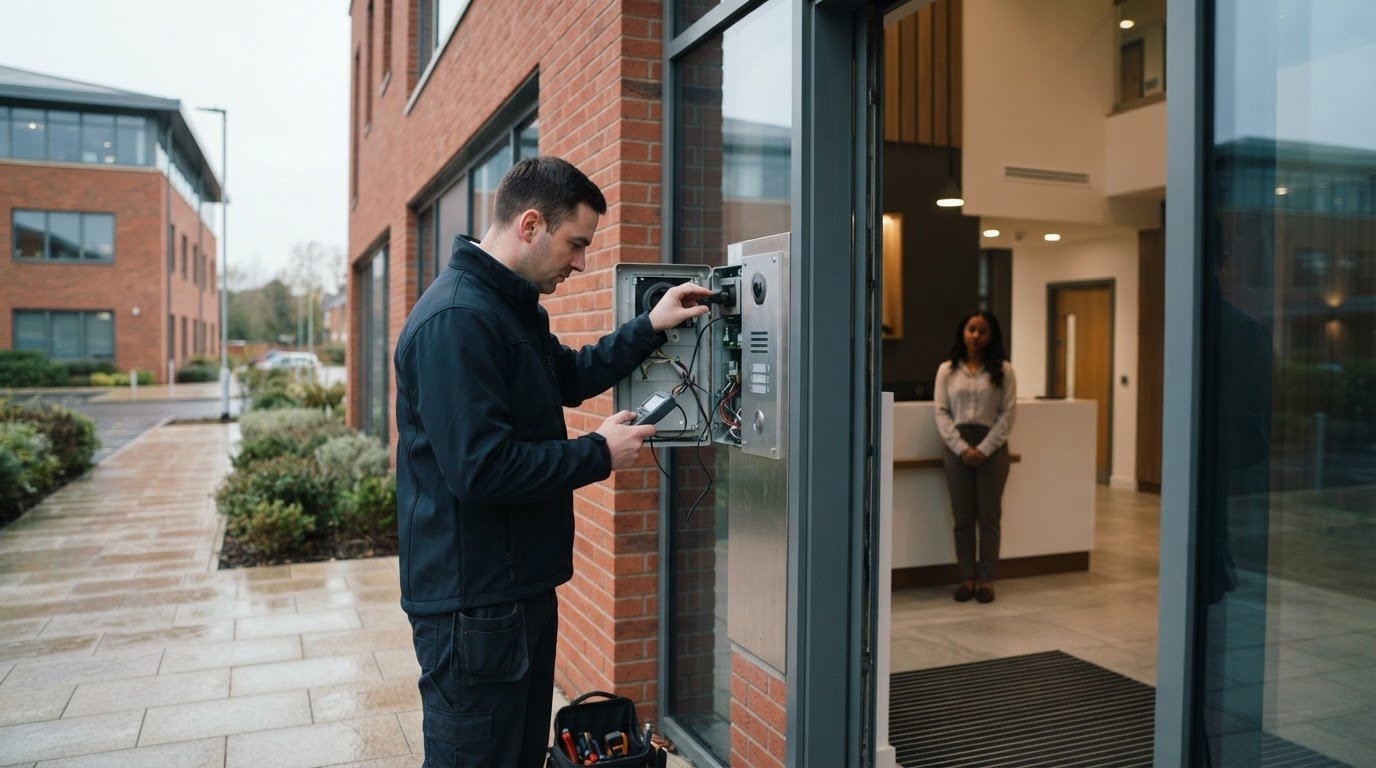
A failed entrance intercom doesn’t always mean the system needs replacing. If you need to fix broken video intercom Essex businesses depend on, a structured diagnosis can help identify whether the fault relates to a station, network connection, power supply or door interface before any equipment is changed.
A malfunction can interrupt reception, affect security procedures and complicate day-to-day site operations. But changing settings or opening equipment without knowing the cause may make diagnosis harder.
This guide covers safe initial checks, signs that call for a closer technical assessment, and factors to weigh when considering repair or replacement. It also explains how commissioning and scheduled maintenance can support reliable operation over time. The aim is to help you make informed decisions about entry management at your Essex premises, whether you manage one entrance or a larger commercial site.
Key Takeaways
- Recognise how faults in communication, video, access or connectivity can affect entry management at a commercial site.
- Record what is and isn’t working, and stick to safe visual checks before considering electrical work or configuration changes.
- To fix broken video intercom Essex businesses rely on, diagnose the fault first rather than assuming the whole system needs replacing.
- Compare repair and replacement by considering the fault’s scope, equipment condition, system compatibility and operational needs.
- Use functional testing, commissioning and planned maintenance to support dependable intercom operation over time.
Broken video intercom in Essex? Identify the symptoms before arranging a repair
At a commercial site, a failed entrance intercom can leave visitors unsure where to go and staff unable to manage arrivals in the usual way. The fault may be a complete outage, but it can also affect just one function: calls may connect intermittently, audio may be unclear, the picture may fail or the door-release command may not work.
A broken video intercom is any fault that affects communication, video, access or system connectivity. These functions form part of wider access control systems, but they don’t necessarily fail together. The symptoms you record are the starting point for diagnosis, not proof of which component has failed.
If you need to fix broken video intercom Essex site staff rely on, describe what happened and where, rather than assuming the whole system needs attention. A clear record helps an engineer assess the fault more efficiently.
Which video intercom symptoms should a site manager record?
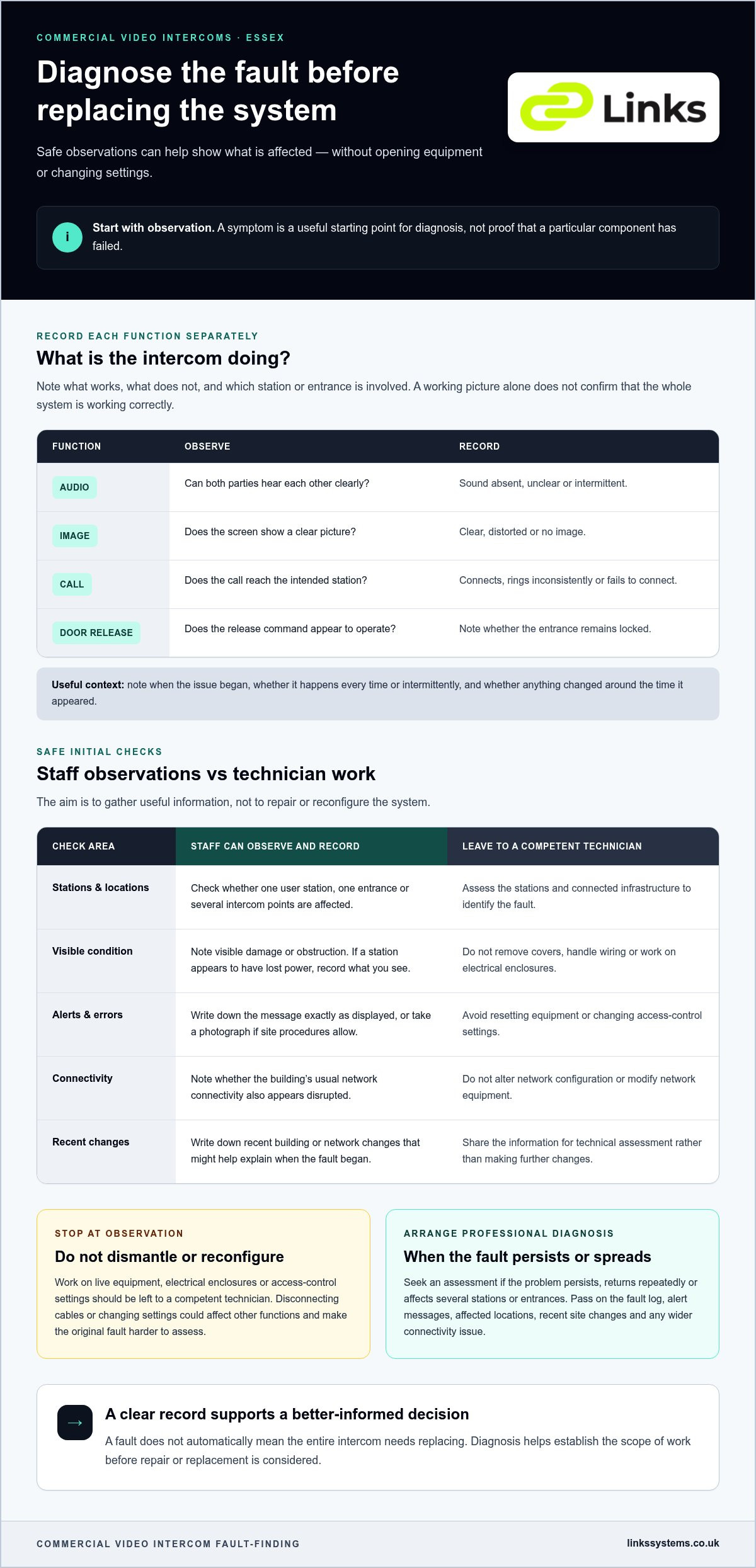
First, establish how much of the system is affected. Does the problem involve one internal station, one entrance or several parts of the site? Note when it began, whether it happens every time or intermittently, and whether anything changed around the time it appeared. Record each function separately:
- Audio: Can both parties hear each other clearly, or is sound absent or intermittent?
- Image: Does the screen show a clear picture, a distorted image or no image?
- Call: Does the call reach the intended station, ring inconsistently or fail to connect?
- Door release: Does the release command appear to operate, or does the entrance remain locked?
These observations create a useful record without requiring staff to open equipment or change settings. If the issue comes and goes, note when it occurs and which station or entrance is involved.
Why can a working screen still hide an intercom fault?
A visible picture confirms only that the video function is working at that moment. Audio, call routing, network connection and door-release functions may behave differently, so a normal-looking screen doesn’t establish that the whole intercom is working correctly.
Partial operation can help narrow the investigation. For example, a call that connects and displays an image but has no clear audio presents a different symptom pattern from a call that never reaches the intended station. Neither pattern identifies the cause on its own. The stations and connected infrastructure need to be assessed before the fault can be attributed to a particular component.
How to check a faulty commercial video intercom safely
Before arranging a technical assessment, staff can make a few non-invasive checks to establish the extent of the fault. The aim is to gather useful information, not to repair or reconfigure the system. On a commercial site, a clear record can help distinguish an isolated station issue from a wider disruption to entry management.
What can staff check without opening the equipment?
Begin with the visible condition and normal operation of the system. Check whether the problem affects one user station or several intercom points, and note any visible damage or obstruction. If a screen or station appears to have lost power, record what you observe without removing its cover or handling wiring.
- Record any alert or error message exactly as displayed, or take a photograph if site procedures allow.
- Note whether the building’s usual network connectivity also appears disrupted, without changing network settings.
- Write down recent building or network changes that might help explain when the fault began.
- Keep a simple log of the checks completed and the results.
These observations give a technician a clearer starting point. Guidance from the National Security Inspectorate on access control system standards also highlights the importance of established practice when managing access control systems.
When should staff stop checking and arrange professional diagnosis?
Stop at observation. Staff can safely record what the system is doing, but work on live equipment, electrical enclosures or access-control settings should be left to a competent technician. Don’t dismantle stations, disconnect cables, reset equipment or alter network configuration. These actions could affect other functions and make the original fault harder to assess.
Arrange an assessment if the problem persists, returns repeatedly or affects several stations or entrances. Share the fault log, alert messages, affected locations and any recent site changes. If normal building connectivity is also affected, include that detail rather than attempting to modify network equipment.
For businesses looking to fix broken video intercom Essex sites depend on, this measured approach supports a more informed diagnosis without risking unnecessary changes. Links Integrated Systems supplies and installs commercial IP video intercom systems, with commissioning and scheduled maintenance to support their operation.
Repair or replace a broken video intercom? Compare the practical options
A reported fault doesn’t automatically mean the entire intercom needs replacing. The right course depends on the diagnosis, the condition of the existing equipment and whether it remains compatible with the wider site. An assessment helps establish the scope of work before a repair or replacement decision is made.
Use these factors to frame the decision:
| Factor | Repair may suit | Broader replacement may suit |
|---|---|---|
| Fault scope | The fault appears limited to an identified component or connection. | Assessment finds faults across multiple parts of the system. |
| Equipment condition | The existing equipment is in suitable condition for continued operation. | Equipment is obsolete, unreliable or affected by recurring problems. |
| Compatibility | The affected part can operate appropriately with the installed system. | Existing equipment limits compatibility with current or planned site systems. |
| Operational needs | The current arrangement still meets the site’s entry-management requirements. | Business operations or site requirements have changed. |
When may a targeted intercom repair be appropriate?
A targeted repair may be appropriate if assessment identifies an isolated fault and the remaining equipment is in suitable condition. The decision also depends on whether the affected component or connection is compatible with the installed system. A symptom alone isn’t enough to confirm that a particular part needs replacing. Diagnosis should establish the cause and inform the proposed work.
For example, if an intercom call and picture work but the door-release function doesn’t, the issue may involve the connection between the intercom and the entrance equipment. Security Magazine discusses how access control and physical doors interact in its guidance on access control and security entrances. The example underlines why the full access function should be assessed, not just the screen.
When should a business consider broader system changes?
Recurring faults, obsolete equipment and changing site requirements can all justify assessing a wider upgrade. A business may also need to consider how its intercom works alongside existing access control and other physical security systems. Compatibility and operational needs should guide any proposed changes, rather than replacing equipment by default.
Links Integrated Systems supplies and installs commercial IP video intercom systems, considering their role in a site’s entry-management needs. The related guide, Physical Security Integration for Commercial Buildings: The 2026 Professional Guide, offers further context on planning systems to work together. For businesses seeking to fix broken video intercom Essex sites rely on, an informed assessment helps define the work and its scope without assuming the outcome in advance.
How professional video intercom fault-finding works for Essex businesses
Professional fault-finding turns reported symptoms into a defined assessment, corrective work and a verified outcome. For a commercial site, the investigation should focus on the affected functions and connected equipment, then recommend work that reflects the fault and the site’s operational requirements. This helps Essex businesses make an informed decision about how to fix broken video intercom systems their premises rely on.
What does a commercial intercom system assessment involve?
The assessment starts with the fault record and a review of the installed system configuration. Technicians can then investigate whether the issue is local to an intercom station or involves connected equipment. Depending on the installation and symptoms, checks may include stations, cabling, network connections and associated access functions. The tests depend on the system and site, so the assessment should establish the relevant scope rather than assume a standard cause.
A structured workflow typically moves through these stages:
- Review: Consider the reported behaviour, affected locations and system configuration.
- Assess: Examine relevant intercom and connected infrastructure to isolate the fault.
- Correct: Carry out work that addresses the identified issue, with recommendations kept relevant to site needs.
- Test: Check the functions affected by the fault after corrective work.
How should repair and commissioning close out the fault?
After corrective work, test the relevant call, audio, video and access functions in the context of the site’s normal operation. Where the fault involves door release, confirm that the intercom and associated entrance function work together. Post-repair testing matters because it verifies that the corrected function operates as intended within the wider entry process.
Close-out should record the work completed and any remaining operational recommendations. If the intercom connects with other security systems, those relationships may also inform the assessment. For further context, see Integrating CCTV with Access Control Systems: A 2026 Professional Specification Guide.
Links Integrated Systems supplies and installs commercial IP video intercom systems, with commissioning and maintenance supporting their lifecycle. For structured system commissioning and functional testing at your Essex premises, explore commercial IP video intercom systems.
Restore dependable video intercom operation with ongoing maintenance
Repairing a fault is one part of keeping an entrance system dependable. Planned maintenance provides an opportunity to review the condition and operation of intercom equipment and its connections, helping identify developing issues before they interrupt site entry. Checks should reflect the installed system and how the business uses each entrance, rather than follow a one-size-fits-all checklist.
What should a commercial video intercom maintenance plan cover?
A suitable plan considers the condition of relevant stations and connections, alongside functional checks that match the system configuration and site requirements. Where the intercom is linked to access control, checks should include the associated entry functions. Record and prioritise findings so the site team understands which issues need follow-up and can plan work accordingly. The appropriate scope and timing depend on the installation and operating needs.
Reviewing the system after a repair, site change or commissioning is also valuable. It helps confirm that the affected functions operate as expected and that any changes have been considered in the wider entry process. Links Integrated Systems supports commercial IP video intercom systems through commissioning and scheduled maintenance, helping businesses manage the system throughout its lifecycle.
How can Essex organisations arrange the next step?
If an issue returns or you’re planning maintenance, prepare a concise summary before discussing the system. Include the symptoms, which entrances or stations are affected, when the fault occurs and any alerts recorded. Note relevant changes to the building or network, too. These details help frame the site requirements and support a focused discussion about next steps.
For Essex businesses looking to fix broken video intercom systems or improve ongoing reliability, Links Integrated Systems provides commercial IP video intercom installation, commissioning and scheduled maintenance. Share the symptoms, affected entrances and any recorded alerts when discussing your site’s requirements.
Discuss your commercial video intercom requirements.
Make your next step towards reliable site entry
A video intercom fault doesn’t automatically call for a full system replacement. Recording which functions and entrances are affected gives fault-finding a clearer starting point, while avoiding electrical work or configuration changes keeps initial checks safely within bounds. Once corrective work is completed, functional testing helps confirm that calling, communication and access operate as needed.
For lasting reliability, consider the system beyond the immediate fault. Reviewing operation after repairs or site changes, alongside planned maintenance, can help keep commercial entry management aligned with your premises’ requirements.
Links Integrated Systems supports commercial sites across Essex, London, Kent, Surrey and Hertfordshire with IP video intercom systems, commissioning and scheduled maintenance. If you’re looking to fix broken video intercom Essex premises rely on, share the symptoms, affected entrances and any recorded alerts to start a focused discussion about your site’s needs.
Discuss your commercial video intercom requirements. A clear assessment and appropriate ongoing care can help keep entry management aligned with your site’s needs.
Frequently Asked Questions
Can a broken video intercom be repaired, or does the whole system need replacing?
A reported fault doesn’t automatically mean the whole system needs replacing. The decision depends on professional diagnosis, the affected components, the condition of the existing equipment and the site’s operational requirements. A fault limited to one area may call for a different response from recurring problems across an older system. Assessment should establish the likely scope of work before repair or replacement is considered, without assuming in advance that any specific component can be repaired.
What are the most common reasons a commercial video intercom stops working?
Possible fault areas include power, connections, equipment, configuration or an associated access function. These are categories to investigate, not a diagnosis: similar symptoms can have different origins. For example, a failed call and an entrance that doesn’t release may involve different parts of the system. Structured fault-finding examines the relevant intercom equipment and connected infrastructure to identify which function is affected before corrective work is recommended.
Can staff troubleshoot a video intercom before calling an engineer?
Yes, staff can record symptoms and make safe visual observations. Note which stations or entrances are affected, when the issue occurs, how audio and video behave, and any displayed alerts. Don’t open enclosures, handle electrical equipment or alter network or access-control settings. Escalate persistent, recurring or wider faults for professional assessment. These notes help frame the diagnosis without risking unnecessary changes to the installed system.
How long does it take to fix a commercial video intercom?
There’s no reliable duration to give without understanding the fault and installation. Timing can depend on the system design, site access, the nature of the problem, and whether parts or further investigation are required. Don’t treat an initial symptom as an indication of how long corrective work will take. Record when the fault occurs, which functions are affected and any alerts, so the assessment can begin with useful context.
Can a video intercom work with an existing access control system?
It may be possible, but integration depends on the equipment, system configuration and functions the site requires. An assessment can establish how intercom calls and access permissions should work together, including the relevant entrance-release operation. Compatibility shouldn’t be assumed from the equipment category alone. For commercial premises, consider the intercom as part of the wider physical security arrangement, with proposed integration aligned to the site’s operational needs.
Why does a video intercom work intermittently rather than fail completely?
Intermittent operation can have several possible origins, including connections, network conditions, equipment or configuration. The pattern alone doesn’t confirm the cause. Log when the issue happens, which station or entrance is involved and whether calling, audio, video or access functions are affected. Repeated intermittent faults warrant professional diagnosis, particularly where staff and visitors depend on the intercom as part of normal entry procedures.
What information should I provide when arranging video intercom fault diagnosis in Essex?
Share the site location, affected entrance or stations, symptoms, any displayed alerts and when the issue began. Include whether the fault is consistent or intermittent, and mention relevant changes to the system or building environment. This information helps frame the assessment and focus attention on the functions involved. Links Integrated Systems supports commercial IP video intercom systems across London, Kent, Surrey, Hertfordshire and Essex.